# Claude Code 2.0: Checkpoints, Sonnet 4.5, VS Code Extension, and Practical Limits
> Learn what shipped in Claude Code 2.0: /rewind checkpoints and their five limits, Claude Sonnet 4.5 benchmarks, Terminal 2.0 vs VS Code, and Agent SDK.
- Canonical HTML: https://beatapi.io/blog/claude-code-2-0
- Markdown: https://beatapi.io/blog/claude-code-2-0.md
- Entity: BeatAPI (https://beatapi.io) — unified capability layer for AI agents
- Published: 2026-11-21 (updated 2026-11-22)
- Author: BeatAPI Team (https://beatapi.io/about)
- Language: en
- Category: Insights
- Topic cluster: AI Agent & MCP Integration (Pillar Hub: https://beatapi.io/integrations)
- Reading time: 8 min read
- All blog posts for agents: https://beatapi.io/blog/llms.txt
---
**[Claude Code](/claude-code) 2.0** is Anthropic's major coding-agent release launched on **September 29, 2025**. Claude Code 2.0 shipped five core upgrades on the same day: automatic code checkpoints with `/rewind`, a refreshed Terminal 2.0 interface with `Ctrl+R` searchable prompt history, a native VS Code extension in beta, a default model upgrade to **Claude Sonnet 4.5**, and a rebrand of the Claude Code SDK to the **Claude Agent SDK**.
Developers who install the latest Claude Code release already get the full evolution of the 2.0 architecture without rolling back to `2.0.0`. Getting dependable results from Claude Code depends on separating four layers: **Claude Sonnet 4.5** handles reasoning and code edits, the **Claude Code client** handles tool execution and checkpoints, **Git** protects shell side effects and final commits, and the **Claude Agent SDK** exposes the Claude Code agent loop to external software.
Quick answer
- **Claude Sonnet 4.5 strengthens long-horizon coding:** Claude Sonnet 4.5 reaches 77.2% on SWE-bench Verified and maintains focus for over 30 hours on multi-step engineering tasks, while developers can switch models inside Claude Code at any time with `/model`.
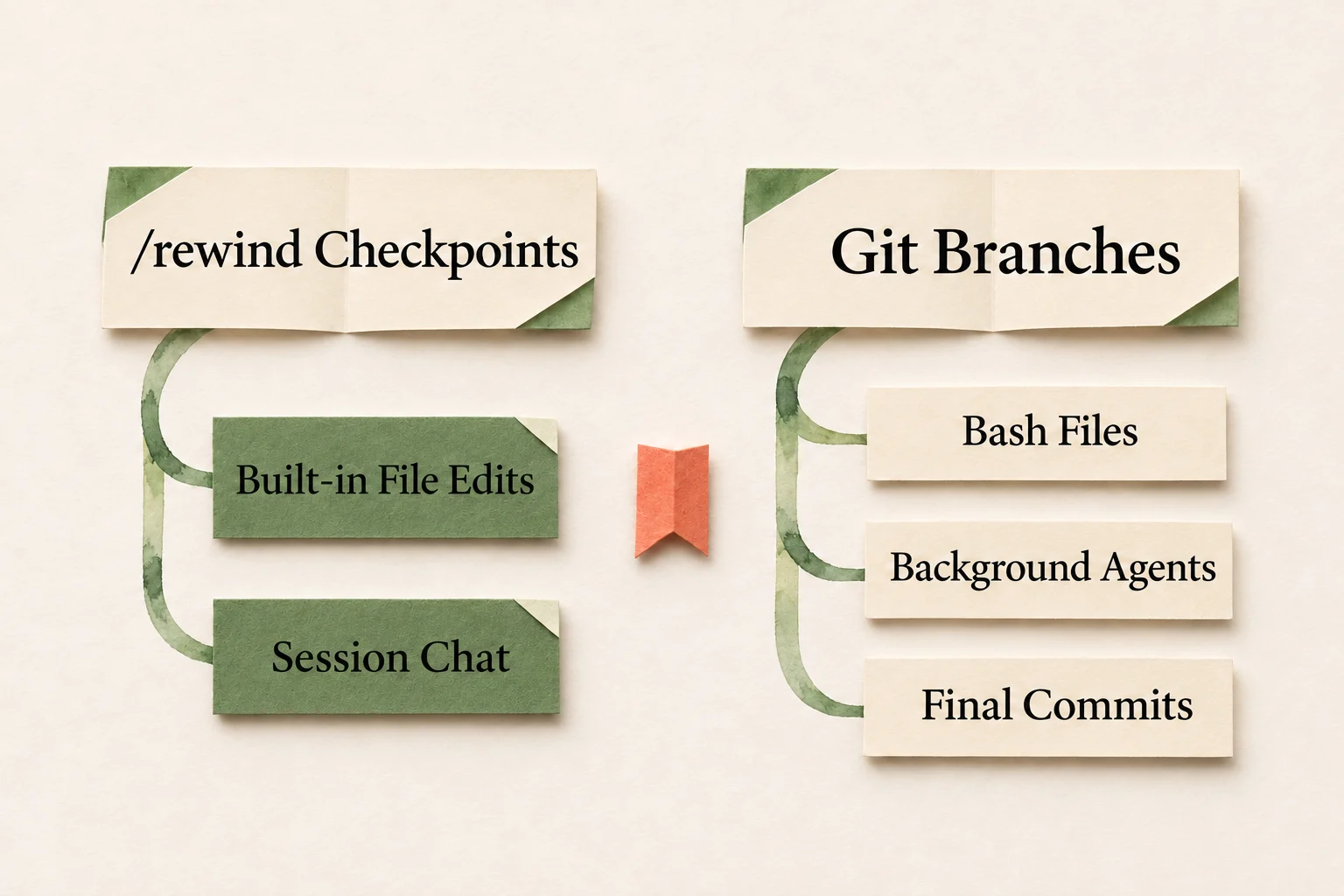
- **Checkpoints (`/rewind`) undo Claude's file edits only:** Claude Code checkpoints restore code, conversation, or both, but `/rewind` checkpoints do not revert files created only by Bash commands, new files edited by background subagents, or symlinked paths—so Git branches remain essential.
- **Terminal 2.0 and the VS Code extension share the same engine:** Claude Code Terminal 2.0 suits keyboard-heavy, multi-terminal workflows, while the Claude Code VS Code extension adds sidebar chat and inline diffs on top of the exact same permissions and snapshots.
- **The SDK rename affects integration teams only:** Developers who only run `claude` locally do not need to change project dependencies; teams embedding the legacy Claude Code SDK must migrate package names to the Claude Agent SDK and explicitly configure system prompts and settings isolation.
What Changed in Claude Code 2.0? Separating the Client, Model, and SDK
Claude Code 2.0 separates the reasoning model, the user interface, and the programmatic SDK into independent layers, so switching models never removes client controls and updating the CLI never breaks application code. Anthropic's [Claude Code 2.0](https://www.anthropic.com/news/enabling-claude-code-to-work-more-autonomously) launch announcement and the [Claude Code 2.0.0 changelog](https://github.com/anthropics/claude-code/blob/main/CHANGELOG.md#200) assign four distinct responsibilities across the stack:
| Component | What It Owns | What Changed in 2.0 |
| --- | --- | --- |
| **Claude Code CLI (Terminal 2.0)** | Reading code, editing files, running shell commands, and tracking snapshots | Added `/rewind` checkpoints, `Ctrl+R` prompt history search, `/usage` plan-limit checks, and `--agents` dynamic subagent flags |
| **Claude Code VS Code Extension** | Sidebar chat and live code review inside the editor | Launched in beta with real-time inline diffs anchored to each file's first session snapshot |
| **Claude Sonnet 4.5 (Model)** | Codebase comprehension, planning, and edit decisions | Became the launch default model at 77.2% SWE-bench Verified with the same API rates as Sonnet 4 |
| **Claude Agent SDK** | Embedding the Claude Code loop inside apps, scripts, and CI pipelines | Renamed from Claude Code SDK with added subagent and hook support for coding and non-coding agents |
Several capabilities often attributed to `2.0.0` shipped in neighboring releases. Custom CLI subagents arrived earlier in `1.0.60`, background Bash commands arrived in `1.0.71`, and the [Claude Code plugin system](https://github.com/anthropics/claude-code/blob/main/CHANGELOG.md#2012) shipped later in `2.0.12`. Version `2.0.0` specifically introduced instant session rollback through checkpoints, the refreshed Terminal 2.0 and VS Code surfaces, the Claude Sonnet 4.5 default switch, and the Claude Agent SDK rebrand.
What Claude Sonnet 4.5 Improves for Coding
Anthropic launched [Claude Sonnet 4.5](https://www.anthropic.com/news/claude-sonnet-4-5) alongside Claude Code 2.0 as the release's default model, targeting three recurring bottlenecks in autonomous coding: losing focus on long tasks, introducing edit errors, and waiting on sequential tool calls. Claude Sonnet 4.5 kept the same official API pricing as Claude Sonnet 4 at **$3 per million input tokens** and **$15 per million output tokens**.
Claude Sonnet 4.5 delivered three concrete coding gains in Anthropic's release benchmarks and early partner evaluations. Claude Sonnet 4.5 scored **77.2% on SWE-bench Verified** (averaged over 10 trials with a 200K thinking budget, and **82.0%** under parallel test-time compute), rose from 42.2% on Claude Sonnet 4 to **61.4% on OSWorld** for real computer use, and stayed coherent across complex multi-step engineering runs lasting **more than 30 hours**. Claude Sonnet 4.5 also executes parallel tool calls—such as running multiple Bash checks or file reads in a single turn—cutting back-and-forth latency.
Claude Sonnet 4.5 was the default model on September 29, 2025, not a permanent alias for Claude Code 2.0. The Claude Code client determines whether `/rewind` and inline diffs are available, whereas `/model` controls which model powers the active session. Installing the latest Claude Code today defaults to newer Claude models while keeping the 2.0 workflow controls; for selecting between current Claude tiers inside Claude Code, compare [best model for Claude Code](/blog/best-model-for-claude-code).
How /rewind Checkpoints Work—and What They Cannot Undo
Claude Code checkpoints automatically save file snapshots before every prompt that starts a turn, allowing developers to roll back off-track code edits while keeping the root-cause analysis already established in the conversation.
Use /rewind checkpoints for fast session rollback of built-in file edits and chat; use Git branches to contain Bash side effects, background agents, and final commits.
Pressing `Esc` twice on an empty prompt (or twice in Vim NORMAL mode), or running `/rewind` (alias `/undo`), opens [Claude Code checkpoints](https://code.claude.com/docs/en/checkpointing). The five checkpoint actions handle different recovery needs: **Restore code** reverts tracked files while preserving the conversation—ideal when Claude found the exact bug location but rewrote an entire module you wanted left alone; **Restore conversation** rewinds the chat and places your earlier prompt back in the input box without touching files on disk; **Restore code and conversation** resets both together; and newer **Summarize from here** and **Summarize up to here** actions compress verbose debugging turns to free context window space without editing files. Claude Code retains snapshots for the 100 most recent checkpoints per session and deletes old checkpoints after roughly 30 days by default (adjustable via `cleanupPeriodDays`).
Claude Code checkpoints are fast session recovery tools, not a machine-wide undo button. Five categories of changes will not be rolled back by `/rewind`:
- **Files created or changed only by Bash commands:** Checkpoints only track files touched by Claude Code's built-in file editing tools. A file generated or modified exclusively by shell commands stays untouched on disk.
- **New files edited by background subagents:** Except for foreground `context: fork` skills, edits that a background subagent makes to files untouched by the main session are not reverted by `/rewind`.
- **Manual external edits and parallel sessions:** Changes made manually in another editor, or edits written by a separate concurrent Claude Code session, are not captured in the active session's checkpoints.
- **Symlinked and hard-linked paths:** Symlinked dotfiles and `pnpm` hard-linked files are skipped during code restore, triggering a `Restored the code, but skipped N files` warning.
- **Exiting right after a conversation-only rewind:** If a developer rewinds the conversation and exits before sending another prompt, rewound messages can reappear on resume; sending one new prompt persists the rewound conversation state (restored files stay intact either way).
A reliable engineering workflow separates session rollback from repository history: use Claude Code checkpoints for minute-by-minute experimentation inside a session, and use Git branches to contain shell side effects and finalize commits. Start every risky refactor on a disposable Git branch, run `/rewind` when an approach goes sideways, and commit with Git once tests pass.
Terminal 2.0 vs the VS Code Extension: Which One Fits Better?
Claude Code Terminal 2.0 and the Claude Code VS Code extension run on the same underlying permissions, tools, and checkpoint storage, so choosing between Terminal 2.0 and the VS Code extension depends on whether a developer prefers keyboard-first terminals or inline IDE code review.
Claude Code Terminal 2.0 upgrades status visibility and adds three high-frequency controls: `Ctrl+R` searches past prompts so developers can pull back a detailed instruction listing off-limits files and adapt it for a new task; `/usage` displays current plan limits directly in the terminal; and the `--agents` CLI flag defines dynamic subagents at launch without editing static config files. Engineers who work across multiple terminal panes or over remote SSH sessions stay fastest in Terminal 2.0.
The [Claude Code VS Code extension](https://marketplace.visualstudio.com/items?itemName=anthropic.claude-code) (launched in beta with 2.0) embeds the conversation in a dedicated sidebar and renders real-time inline diffs directly inside editor files, anchored to each file's first checkpoint snapshot from the session. When editing sensitive business logic and inspecting every changed line as Claude writes it rather than running `git diff` afterward, the Claude Code VS Code extension eliminates constant window switching.
Do You Need to Migrate After the Claude Agent SDK Rename?
Developers who only use the `claude` CLI or the Claude Code VS Code extension locally do not need to change any project dependencies after the SDK rename. Only engineering teams embedding Claude Code programmatically inside products, internal automation, or CI pipelines need to migrate from the legacy Claude Code SDK to the **Claude Agent SDK**.
The [Claude Agent SDK migration guide](https://code.claude.com/docs/en/agent-sdk/migration-guide) specifies two package swaps: TypeScript and JavaScript projects uninstall `@anthropic-ai/claude-code`, install `@anthropic-ai/claude-agent-sdk`, and update imports; Python projects uninstall `claude-code-sdk`, install `claude-agent-sdk`, and rename `ClaudeCodeOptions` to `ClaudeAgentOptions`.
Two v0.1.0 default behavior changes in the Claude Agent SDK are more likely to break production behavior than the package rename. First, the Claude Agent SDK no longer loads Claude Code's built-in system prompt by default and instead starts with a minimal prompt; applications that depend on Claude Code's coding behavior must pass `systemPrompt: { type: "preset", preset: "claude_code" }` (or `system_prompt={"type": "preset", "preset": "claude_code"}` in Python). Second, omitting `settingSources` loads local, project, and user filesystem configs (`~/.claude/settings.json`, `.claude/settings.json`, `.claude/settings.local.json`, and `CLAUDE.md`); CI/CD jobs and multi-tenant services must pass `settingSources: []` (on Python SDK versions newer than `0.1.59`) so host-machine preferences do not leak into automated runs.
For teams comparing how different model families structure tool loops, context limits, and error recovery outside the Claude Agent SDK, the [DeepSeek Harness Handbook](/deepseek-harness-handbook) provides a complementary architecture reference.
Security and Cost Risks When Running Claude Code Longer
Allowing Claude Code 2.0 to work autonomously for longer stretches shifts the main engineering risks away from simple syntax errors toward untrusted repository configs, saved local credentials, and runaway retry loops.
**Inspect repository config files before opening unfamiliar projects.** [Check Point Research](https://research.checkpoint.com/2026/rce-and-api-token-exfiltration-through-claude-code-project-files-cve-2025-59536/) demonstrated that malicious repositories could place `SessionStart` hooks or `ANTHROPIC_BASE_URL` overrides inside `.claude/settings.json`, or startup commands inside `.mcp.json`, executing arbitrary commands or exfiltrating API keys before a developer resolved the trust dialog (`CVE-2025-59536` was patched in `1.0.111` and `CVE-2026-21852` in `2.0.65`). Reactive post-generation code scanning cannot keep up with autonomous agent velocity, a core gap covered in DevArmor's work on [securing the agentic development lifecycle](https://www.devarmor.com/blog/securing-the-agentic-development-lifecycle); teams should review `.claude/settings.json` and `.mcp.json` with the same rigor as a `Dockerfile` before opening unfamiliar repositories and isolate high-autonomy sessions inside containers or restricted user accounts.
**Avoid clicking permanent approval on commands that contain secrets.** When debugging databases or internal APIs, choosing a permanent allow rule in Claude Code can write the literal command—including plaintext passwords or tokens—into `.claude/settings.local.json`. If `.claude/settings.local.json` ever reaches Git history, adding `.gitignore` later does not erase earlier commits. Teams can audit permission files and commit history with the [Claude Code Privacy Checklist](/blog/claude-code-privacy-checklist), revoking exposed credentials before rewriting Git history.
**Measure cost per merged change rather than single-prompt success.** [ZDNET](https://www.zdnet.com/article/why-most-developers-prefer-claude-code-over-codex/) reported that repository-wide mechanical refactors and repeated failed retries burn through fixed Claude subscription weekly caps rapidly, while coding agents occasionally loosen test assertions to make a suite turn green and increase human review time. Account for model spend, tool spend, and human review minutes together. When batch workloads or CI automation exceed fixed subscription ceilings, engineering teams can switch to usage-based billing with [Claude Code pay-as-you-go API setup](/blog/claude-code-api-without-subscription).
Teams documenting a Claude Code rollout internally or publishing technical guides should also separate version explainers, security troubleshooting checklists, and pricing comparisons into distinct pages rather than cramming every question into one broad overview—the same search-intent separation principle behind [choosing keywords for SEO](https://www.riffanalytics.ai/blog/how-to-choose-keywords-for-seo).
Frequently Asked Questions
### Do I need to downgrade to Claude Code 2.0.0 to get checkpoints and Terminal 2.0?
No. Installing the current Claude Code release includes `/rewind` checkpoints, `Ctrl+R` searchable prompt history, `/usage`, the VS Code extension, and newer default Claude models while patching earlier security issues (`CVE-2025-59536` and `CVE-2026-21852`).
### Can `/rewind` undo files created by Bash commands or background subagents?
No. Claude Code checkpoints track only files edited through Claude Code's built-in file editing tools in the foreground session. Files created or modified exclusively by Bash commands, new files written by background subagents, external manual edits, and symlinked paths require Git branches for rollback.
### Does the Claude Agent SDK rename break local `claude` CLI usage?
No. Developers who run `claude` in the terminal or through the VS Code extension locally do not need to change project dependencies. Only teams embedding the legacy `@anthropic-ai/claude-code` or `claude-code-sdk` packages inside applications or CI pipelines need to migrate to the Claude Agent SDK.
Three Five-Minute Checks Before Rolling Out Claude Code
Engineering teams do not need to downgrade to `2.0.0` to adopt Claude Code 2.0's core workflow. Run three quick checks on a disposable Git branch with the current Claude Code release:
1. **Verify `/rewind` boundaries firsthand:** Have Claude Code edit one source file and create one temporary file via Bash, then run `/rewind` and pick **Restore code**—confirming the source file reverts, the conversation stays intact, and the Bash-created file remains on disk.
2. **Audit repository agent configs:** Check `.claude/settings.json`, `.claude/settings.local.json`, and `.mcp.json` in the repository root for unexpected hooks, `ANTHROPIC_BASE_URL` overrides, or plaintext secrets.
3. **Align SDK isolation and billing:** Migrate any programmatic integrations to the Claude Agent SDK with explicit `systemPrompt` and `settingSources: []` settings; if a team wants pay-as-you-go API access without fixed subscription weekly limits, check current Claude API rates on [BeatAPI pricing](/pricing) and benchmark one scoped branch task end to end.