Where can I get a free JEV API?
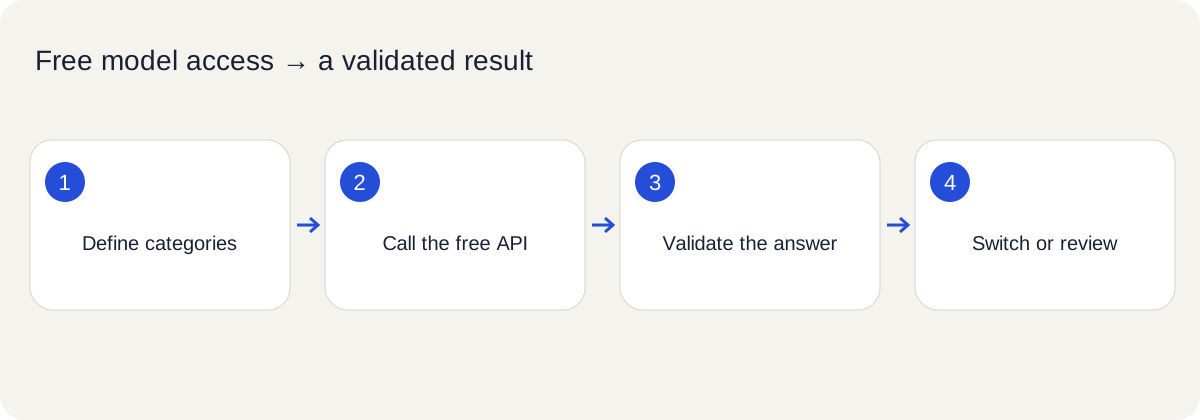
For n8n text classification with a fixed set of labels, call BeatAPI's free JEV API through an HTTP Request node, read the typed answer, and pass a validated label to a Switch node. The free model is jev-1.13-free; input and output cost $0, including at a zero balance. You do not need a text-generating agent to write a category as prose.
- Define category names before sending the request.
- Use
POST https://api.beatapi.io/v1/systemone with a BeatAPI key.
- Read the response's
answers, rather than parsing a generated paragraph.
- Route malformed or uncertain decisions to a review branch.
- Keep input IDs alongside decisions and pace calls within the account limit.
The JEV API is the setup destination. The existing JEV decision-layer guide explains its broader agent use cases; this tutorial concentrates on wiring a classifier into n8n.
Follow the connection and validation steps in order. On mobile, swipe horizontally to read the diagram.
Free JEV API access: key, endpoint, and model
| Question | BeatAPI route |
|---|
| Where do I get the key? | Dashboard → API keys, default auto group |
| Which model is free? | jev-1.13-free |
| Endpoint | POST https://api.beatapi.io/v1/systemone |
| Request fields | model, state, questions |
| Output | Named typed decisions under answers |
| Initial account limit | One successful call per minute |
| After any top-up | Up to ten successful calls per minute; no automatic model switch |
The free JEV API on BeatAPI uses a BeatAPI key. Do not paste a key from another service into this endpoint or assume a third-party community node accepts it. The built-in HTTP Request path below makes every connection setting visible.
The free JEV API is useful when the answer belongs to a predefined set. Its value here is a bounded classification response you can validate, rather than a promise that all automation should use a decision model.
Which free JEV API offer actually fits your workflow?
The following distinction was checked on October 2, 2026. Free JEV API access on BeatAPI means a reusable key and the explicitly selected free model, subject to the limits above. Other access routes have different conditions:
| Route | What its public source establishes | Practical difference |
|---|
| TypeSafe direct | TypeSafe key, https://api.typesafe.ai/v1/systemone, jev-latest | Separate credentials; the quickstart does not establish a recurring free allowance |
| OpenRouter JEV | $0.042 per million input tokens, $0 output | Free output alone does not make the request free |
| n8n Cloud promotion | Eligible Cloud plans can use JEV via Gateway credits until October 10, 2026, 23:59 UTC without consuming credits | In-product promotion, not a reusable external API key; normal Gateway rates apply afterward |
| Vercel Academy promotion | The stated free period ended September 25, 2026 | An older tutorial is not evidence of a current free offer |
Choose the free JEV API route by the requirement: a reusable external key, built-in access within an existing subscription, or higher paid throughput. Check current terms instead of carrying an expired promotion into your configuration.
What the free JEV API changes in a classifier
In an n8n community question, a user running a text-classification template received a parsing error because the model returned Markdown-wrapped content instead of the expected JSON. Their report concerned a local model and n8n 1.72.1. It illustrates a failure mode, rather than proving that current n8n classifiers are broken.
If the task is “choose one of these categories,” your application already knows the legal output set. A typed decision API avoids asking a generative model to reproduce that set in a correctly formatted paragraph. You still parse the HTTP response as JSON and validate its fields; what disappears is the extra step of interpreting generated text as a second JSON document.
Use a generative model when you need a summary, explanation, or reply. Use deterministic rules when an exact keyword or field decides the outcome. JEV is useful for the fuzzy classification between those two cases.
Design a small free JEV API classification workflow
This worked example sorts release notes into three categories:
| Category ID | Definition | Next step |
|---|
feature | Adds a new user-facing capability | Product-update draft queue |
fix | Corrects an existing failure | Fix-note draft queue |
other | Does not clearly fit either category | General review queue |
The workflow is:
Manual Trigger → sample records → HTTP Request → validate answer → Switch
                                                    ↓
                                              review on uncertainty
Start with a Manual Trigger and one synthetic record: id: note-001, text: Fixed duplicate rows in CSV downloads. There is no need to connect a production mailbox or send messages while proving the classifier.
Category IDs should stay stable even when you translate the displayed labels. Those IDs become Switch conditions, stored results, and evaluation labels.
Configure the free JEV API request in n8n
In the HTTP Request node, configure:
| Setting | Value |
|---|
| Method | POST |
| URL | https://api.beatapi.io/v1/systemone |
| Authentication | Header Auth credential |
| Credential header | Authorization: Bearer YOUR_BEATAPI_KEY |
| Body type | JSON |
| Response format | JSON |
Store the key in an n8n credential. Keep the BeatAPI key's group at auto. JEV is not a Chat Completions model, so an OpenAI Chat Model node is not the request surface for this example.
For the first manual test, send this fixed body:
{
  "model": "jev-1.13-free",
  "state": {
    "id": "note-001",
    "text": "Fixed duplicate rows in CSV downloads."
  },
  "questions": {
    "category": {
      "type": "choice",
      "instructions": "Classify this release note by its main user-visible change.",
      "criteria": {
        "feature": "Adds a new user-facing capability.",
        "fix": "Corrects a failure in an existing capability.",
        "other": "Does not clearly fit feature or fix."
      }
    }
  }
}
Then change the whole JSON body to an n8n expression that returns an object:
{{ ({
  model: 'jev-1.13-free',
  state: { id: $json.id, text: $json.text },
  questions: {
    category: {
      type: 'choice',
      instructions: 'Classify this release note by its main user-visible change.',
      criteria: {
        feature: 'Adds a new user-facing capability.',
        fix: 'Corrects a failure in an existing capability.',
        other: 'Does not clearly fit feature or fix.'
      }
    }
  }
}) }}
This expression avoids constructing JSON by interpolating text inside quotation marks. Inspect the outgoing body to ensure it contains the input record, not the literal characters $json.text. The setup is a contract-based example; it has not been executed against a live n8n workspace in this guide.
Validate a free JEV API answer before branching
The Decisions API documentation describes named answers under answers. For a Choice question, read the choice, category probabilities, and confidence. The following is a synthetic fixture for testing your mapping, not a measured model result:
{
  "answers": {
    "category": {
      "type": "choice",
      "choice": "fix",
      "probabilities": { "feature": 0.03, "fix": 0.95, "other": 0.02 },
      "confidence": 0.94
    }
  }
}
In a Code node with Mode set to Run Once for Each Item, validate and normalize the decision:
const answer = $json.answers?.category;
const allowed = ['feature', 'fix', 'other'];
const labelValid = answer?.type === 'choice' && allowed.includes(answer.choice);
const confidenceValid = Number.isFinite(answer?.confidence)
  && answer.confidence >= 0 && answer.confidence <= 1;
const probabilities = allowed.map(label => answer?.probabilities?.[label]);
const distributionValid = probabilities.every(p => Number.isFinite(p) && p >= 0 && p <= 1)
  && Math.abs(probabilities.reduce((sum, p) => sum + p, 0) - 1) < 0.01;
const valid = labelValid && confidenceValid && distributionValid;
const threshold = 0.8; // Illustrative starting policy; evaluate before operational use.

return { json: {
  request_id: $json.id ?? null,
  category: valid ? answer.choice : null,
  confidence: valid ? answer.confidence : null,
  route: valid && answer.confidence >= threshold ? answer.choice : 'review'
} };
If you enable full-response output in the HTTP Request node, the payload may be under body; update the mapping accordingly. Do not quietly turn a missing answer into an accepted category.
Configure Switch branches for feature, fix, other, and review, using the normalized route. Keep the default branch connected to review too. Review indicates uncertainty or invalid data; other is an intentional category.
Preserve free JEV API input records and evaluate the threshold
The response's id is an API request identifier, not the input record ID. Preserve your original note-001 separately using n8n item linking or a Merge step. When retries or concurrent branches are introduced, do not match outputs by array position alone.
Before automating downstream work, hand-label a small set containing straightforward features, obvious fixes, mixed notes, and insufficient context. Compare predicted categories with your labels. Review both wrong high-confidence results and correctly rejected ambiguous cases.
The 0.8 threshold in the code is a demonstration policy. It does not mean 80% real-world accuracy and is not a verified threshold for your data. Raise, lower, or replace it based on your evaluation and the cost of a wrong branch. Keep the first run connected to draft queues or logs.
Free JEV API limits: pace your n8n workflow
The free JEV API allows one successful call per minute per account before the first top-up, and up to ten afterward. Use a paced, small test set. Coordinate overlapping executions because multiple keys still share the account limit. For 429, honor the documented Retry-After header and bound retries.
These limits make the free route useful for learning and small experiments. They do not establish that a large inbound queue can run continuously for free. Any top-up leaves the free model free; paid usage requires explicitly selecting jev-1.13.
Free JEV API FAQ
Yes, this example uses the built-in HTTP Request, Code, and Switch nodes. It does not assume a third-party node supports BeatAPI credentials or its endpoint.
Does this remove all JSON parsing?
No. n8n still decodes the API response. It avoids parsing model-generated prose or Markdown into a separate JSON object.
Is JEV an API for generating emails?
No. This request chooses a category. A separate text model can write a draft after the workflow has validated the branch.
Does the free JEV API work with no balance?
The documented jev-1.13-free route supports a zero balance with an auto group key. Check the JEV API for current conditions.
Should I route every answer to its highest-probability label?
No. Retain a review path for uncertainty, invalid answers, and unsupported input. A probability signal is not permission for a consequential action.
No. It is a historical user problem that motivates the design. Validate the current n8n version and your actual workflow before deploying it.