MCP Servers for Social Media Data in 2026: Static Tool Lists vs Dynamic Search-Inspect-Run
Compare static tool lists, scoped lists, and dynamic Search-Inspect-Run for social data MCP servers: context cost, Prompt Cache stability, and accuracy.
When connecting an AI agent to public social media data in 2026, static tool lists fit narrow workflows locked to one to three platforms with explicit tool trimming, while dynamic Search-Inspect-Run fits multi-platform research, cross-capability agent workflows, Prompt Cache stability, and pre-run contract and price checks. Both architectures retrieve public posts, profiles, and comments; they diverge in how the MCP server structures tools/list across hundreds or thousands of endpoints and how it keeps raw social JSON from flooding the model's context window.
A static tool list MCP server maps each social media REST endpoint one-to-one into an MCP tool definition and injects those schemas into the model prompt during initialization. A dynamic Search-Inspect-Run MCP server keeps the full action catalog on the server side, exposes a small fixed set of meta-tools, and lets the agent search for matching actions, inspect one contract and live price before spending credits, and execute with bounded payload previews.
Quick answer
Static flat tool lists consume tens of thousands of tokens before the first user turn and degrade tool routing: The Model Context Protocol client best practices (2026-07-28) contrast roughly 150,000 upfront tokens for full tool loading against roughly 2,000 tokens for progressive discovery, and Anthropic's advanced tool use research reports MCP evaluation accuracy rising from 49% to 74% on Claude Opus 4 and from 79.5% to 88.1% on Claude Opus 4.5 when tools load on demand.
Scoped static tool lists lower startup overhead but keep cross-platform friction and payload bloat: Filtering tools/list down to 10–20 tools for one or two platforms cuts initial schema tokens, yet expanding to an unplanned platform requires reconfiguring the MCP connection and raw social JSON responses can still overflow context across turns.
Fixed meta-tools protect Prompt Cache prefixes while gating spend before execution: The MCP specification warns that mutating the tools array mid-conversation via notifications/tools/list_changed invalidates provider prompt caches; keeping a fixed manifest—such as BeatAPI MCP's three core capability meta-tools totaling 6,418 characters—keeps the tools array byte-stable across platforms and enables free pre-run inspection.
Dynamic Search-Inspect-Run trades extra round trips and retrieval dependence for scale: Anthropic documents lower ROI for on-demand search when an agent has fewer than 10 compact, constantly used tools, and poor search recall breaks downstream execution—so high-frequency fixed lookups should cache inspected contracts by schema hash or move to direct REST APIs.
Why public social media data triggers MCP tool bloat faster than SaaS APIs
Public social media data MCP servers accumulate over 1,000 endpoints far faster than ordinary SaaS connectors because every social network uses distinct object models, identifier schemes, and read-only retrieval surfaces. Before evaluating MCP architectures, separate public social media data servers from social publishing servers, because the two categories carry different tool counts, authentication models, and security boundaries.
Social publishing and account-management MCP servers operate on accounts you already own through OAuth tokens. Those servers typically expose 10 to 40 tools for drafting posts, scheduling calendars, reading inbox threads, or checking owned analytics. Official ad-platform MCP servers—such as Meta Ads MCP and TikTok for Business MCP—similarly focus on authorized ad accounts rather than cross-platform public organic research.
Public social media data MCP servers read public profiles, posts, comment trees, keyword searches, and video transcripts without holding write permissions to your brand accounts. Even a single platform splits into dozens of distinct operations across profiles, feeds, post details, keyword search, hashtag search, top-level comments, comment replies, and trends. Once a server covers 20 or more global and regional networks, the underlying catalog naturally crosses 1,000 actions. Even inside one network's advertising surface, TikTok for Business MCP documentation distinguishes roughly 400 tools in flat mode from roughly 40 tools in progressive mode, illustrating the scaling pressure inherent to social-platform schemas.
How static tool lists, scoped lists, and dynamic Search-Inspect-Run work
Social media data MCP servers organize large endpoint catalogs through three protocol patterns: static flat tool lists, scoped static tool lists, and dynamic Search-Inspect-Run. These three patterns differ in what tools/list returns at connection startup and when full parameter schemas enter the language model's context.
A static flat tool list exposes every backend REST route as an individual named MCP tool—typically following a {platform}_{resource}_{action} convention—and sends every tool description and inputSchema to the client on tools/list. When a server holds fewer than 15 compact tools, a flat list lets the model call the exact typed function in a single turn with zero discovery indirection. At hundreds or thousands of social endpoints, that one-to-one mapping injects a massive static schema block into every request.
Pattern 2: Scoped static tool lists (pre-filtered by URL or tool group)
A scoped static tool list keeps the one-endpoint-per-tool design on the server but lets the developer restrict tools/list through connection parameters such as platform filters, presets, or tool groups. A team that only needs TikTok profiles and YouTube comments trims the exposed manifest down to a manageable subset at setup time. Some scoped servers also attach a natural-language router tool to catch requests outside the preset, though single-step routers often execute and bill the routed lookup immediately without pausing for parameter or price inspection.
Pattern 3: Dynamic Search-Inspect-Run (fixed meta-tools with progressive discovery)
Dynamic Search-Inspect-Run implements the three-layer progressive discovery model—Catalog, Inspect, and Execute—documented in the MCP client best practices, moving catalog search and contract delivery onto the server. On tools/list, the server always returns the same compact set of meta-tools: a Search tool that accepts natural language and returns short candidate cards, an Inspect tool that returns one selected action's full input_schema, price, readiness, and next-call template for free, and a Run tool that executes the exact reference with built-in output preview controls.
Architectural dimension
Static flat tool list
Scoped static tool list
Dynamic Search-Inspect-Run
tools/list shape
Hundreds to 1,000+ endpoint-specific tools loaded upfront
Developer-selected platform or group subset (typically 10–60 tools)
Fixed set of 3 core meta-tools (Search, Inspect, Run), optionally paired with a few high-frequency tools
Startup context cost
Very high; tens of thousands of tokens consumed before the first prompt
Low to moderate; scales linearly with selected platforms
Constant and minimal; adding 500 backend actions does not grow tools/list
Unplanned cross-platform exploration
All platforms present, but crowded schemas raise misselection risk
Blocked until a human edits the scoped URL or reconnects
Native; the agent discovers any covered platform within the same session
Prompt Cache behavior
Static array, but carries a heavy unpruned prefix baseline
Stable within one session; changing scopes forces a new prefix
Optimal; tools array remains byte-identical across turns and platforms
Pre-run parameter and price gate
Weak; pricing and nuances rely on static descriptions or external docs
Weak; fallback natural-language routers often bill immediately upon routing
Built-in; free Inspect returns required inputs, live price, billing unit, and readiness
First-call latency on an unfamiliar action
1 tool round trip if the model selects the right tool and parameters
1 tool round trip for tools inside the preconfigured scope
2–3 tool round trips (Search → Inspect → Run); 1 round trip once cached by schema hash
Large JSON payload protection
Usually returns full REST payloads directly into conversation history
Usually returns full REST payloads directly into conversation history
Centralized in Run via default preview truncation, fields projection, or staged retrieval
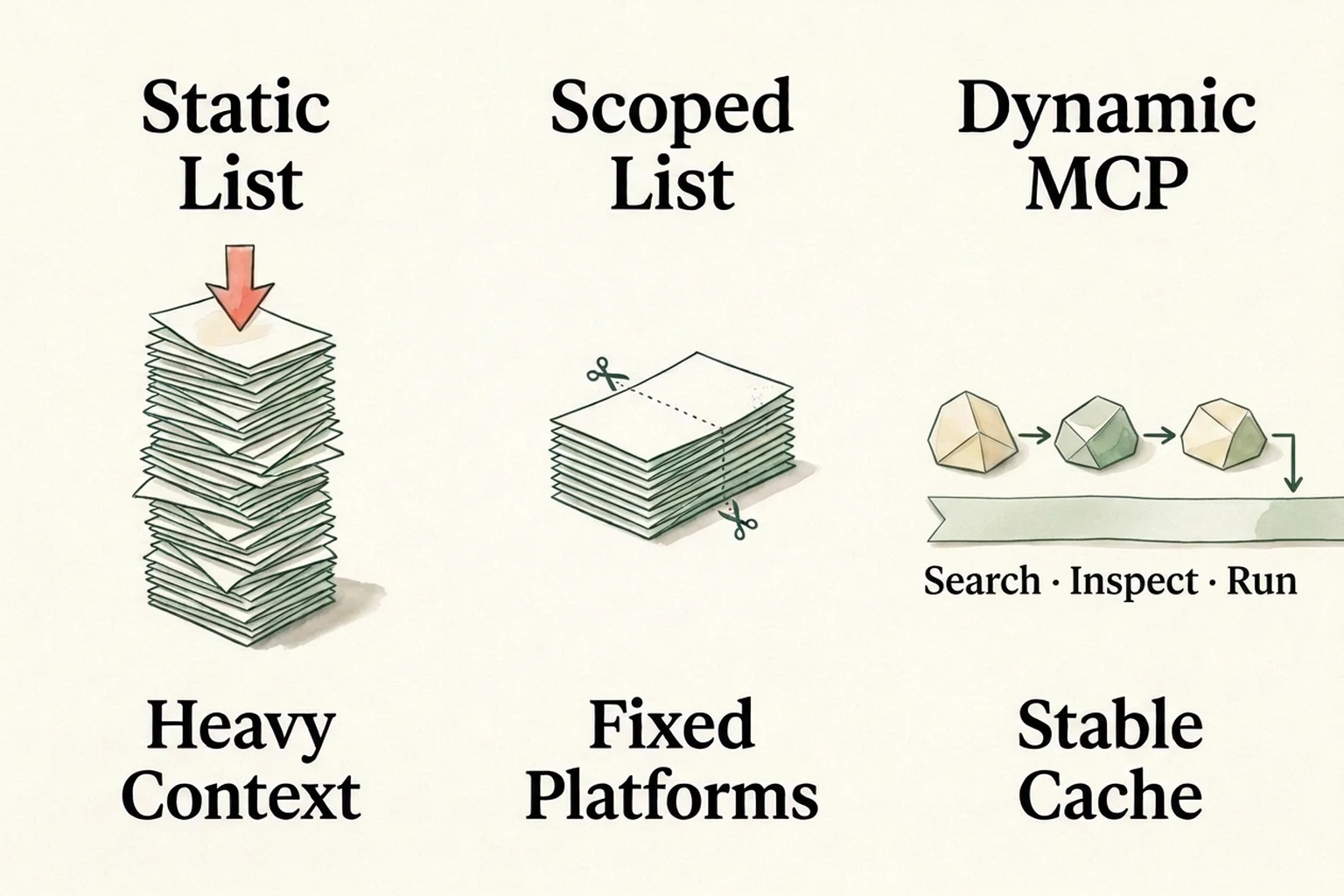
How Static List, Scoped List, and Dynamic Search-Inspect-Run trade startup context volume, platform flexibility, and Prompt Cache stability.
Four engineering bottlenecks of static tool lists at social-data scale
Once a social media data MCP server spans dozens of platforms and granular retrieval endpoints, static tool lists hit four measurable bottlenecks: upfront token tax, near-duplicate tool misselection, mid-session Prompt Cache invalidation, and unbounded response payload pollution. Each bottleneck directly impacts agent reliability and session cost.
1. Upfront schema definitions consume tens of thousands of tokens before work begins
Every static MCP tool adds a name, description, JSON Schema property tree, enum constraints, and required field declarations to the prompt prefix. Public engineering measurements show how rapidly this baseline expands: Atlassian's engineering team measured 17,600 tokens for the official GitHub MCP server's 94 tools and roughly 10,000 tokens for Jira and Confluence tools alone. Anthropic recorded roughly 55,000 tokens across five MCP servers totaling 58 tools, roughly 72,000 tokens for 50+ MCP tools, and up to 134,000 tokens before optimization in internal setups. The MCP client best practices place naive full-catalog loading at roughly 150,000 tokens compared with roughly 2,000 tokens for progressive discovery. When a coding or research agent already connects to repository, documentation, and web servers, adding a 1,000-tool static social MCP leaves little room for reasoning.
2. Similar social endpoint names trigger wrong tool calls and parameter hallucinations
Large static lists do not merely inflate input bills; they lower selection accuracy. Anthropic's internal MCP evaluations report that switching from full upfront tool loading to on-demand search raised accuracy from 49% to 74% on Claude Opus 4 and from 79.5% to 88.1% on Claude Opus 4.5. Social media catalogs amplify naming collisions because every network repeats parallel verbs—profile lookup, user posts, keyword search, post detail, comments, and replies—while requiring incompatible identifiers. TikTok endpoints separate uniqueId, secUid, and itemId; YouTube comments require an exact 11-character video_id; Xiaohongshu note detail lookups require both note_id and xsec_token. Exposing hundreds of parallel schemas simultaneously invites cross-platform parameter mix-ups.
Some MCP implementations try to shrink static lists dynamically by registering or removing tools mid-session and emitting notifications/tools/list_changed. The MCP client best practices explicitly warn against that pattern for active sessions: major model providers cache the prompt prefix including the tools array, so adding, removing, or reordering tool definitions mid-conversation invalidates the prefix cache and can cost more tokens than the pruned definitions saved. The specification recommends routing calls through a stable meta-tool interface so the tools array never changes—the exact property a fixed Search-Inspect-Run surface delivers out of the box.
4. Unbounded raw social JSON rapidly fills multi-turn context windows
A single page of social comments, creator posts, or search hits routinely returns 30 KB to 100 KB of nested JSON packed with multi-resolution CDN thumbnails, author metadata, and platform tracking tokens. Static endpoint wrappers typically return the entire REST body straight into the model's conversation history, where every subsequent turn pays to re-read those tokens. A unified dynamic Run boundary allows the server to enforce compact preview responses by default and hand back specific fields or full payloads only when the agent asks for them.
Real trade-offs and failure boundaries of dynamic Search-Inspect-Run
Dynamic Search-Inspect-Run is not a universal replacement for static tools: it depends on catalog retrieval quality, adds one to two extra round trips on first-time lookups, and surfaces native action granularity rather than always hiding platform differences behind one rigid output schema. Teams adopting dynamic discovery should design around three concrete constraints.
1. Catalog search recall sets the ceiling on task completion
In a dynamic MCP architecture, if the initial Search call fails to surface the right action, even a frontier reasoning model cannot invoke it. The MCP client best practices contrast keyword retrieval (BM25 or regex), embedding search, subagent routing, and hybrid ranking: literal keyword search misses synonyms and multilingual queries, while vague descriptions degrade recall across every retrieval method. Reliable dynamic servers therefore pair hybrid search with explicit candidate cards, match explanations, and missing-input indicators—and agent instructions should require reading Inspect before executing rather than blindly running the top-ranked hit. For instance, a search for YouTube video comments can rank a comment-replies action ahead of the top-level video-comments action, and inspecting required inputs catches the mismatch before any billable call runs.
2. Small or repetitive toolsets pay an unnecessary discovery tax
Anthropic notes that dynamic tool search yields lower ROI when an agent uses fewer than 10 tools, keeps compact schemas, or calls every tool in nearly every session. The MCP client best practices likewise recommend loading tools directly below a context threshold (such as 1%–5% of the context window) and switching to progressive discovery above it. Even inside a dynamic server, re-running Search and Inspect before every single call in a 30-account batch wastes round-trip latency. Production agents avoid that waste by caching the inspected contract against the server's schema fingerprint (schema_hash) within the session and moving scheduled bulk jobs off MCP onto direct REST calls.
Servers that expose 1,000+ platform-native actions across global and regional networks often publish strict input schemas and pricing for every action while leaving rapidly evolving nested output payloads undocumented (readiness: "runnable" rather than ready). An agent working with runnable actions must inspect the returned preview payload to locate field paths rather than hardcoding an assumed universal field name across every social network.
When to choose static tool lists vs dynamic Search-Inspect-Run
Select your social media data MCP architecture from four concrete workload constraints—number of platforms touched per session, whether target endpoints are known upfront, whether the agent chains non-social capabilities, and sensitivity to context and Prompt Cache costs—rather than headline endpoint counts.
Workload scenario
Primary engineering bottleneck
Recommended architecture
Implementation guardrail
Narrow assistant on 1–2 fixed platforms (<15 tools total)
Single-turn latency with completely fixed endpoint scope
Scoped static tool list
Cap tools/list at the exact 10–15 needed tools; avoid connecting unfiltered full catalogs.
Cross-platform creator, post, and comment research (global + APAC networks)
Target platforms and operations vary dynamically per prompt
Dynamic Search-Inspect-Run
Require free Inspect before Run; forbid constructing action references from platform names.
End-to-end research and content agents (social data + SEO + web search + AI models)
Stacking separate MCP servers floods context, breaks caches, and fragments keys
Keep one fixed meta-tool manifest across data and model pillars so Prompt Cache stays warm.
Scheduled daily monitoring or bulk ingestion for fixed account lists
Throughput, deterministic retries, and eliminating LLM inference cost
Direct REST API / SDK (no MCP in the cron loop)
Use MCP to prototype and inspect contracts, then move recurring jobs to direct HTTP calls.
Dynamic Search-Inspect-Run in practice: BeatAPI MCP
BeatAPI MCP (https://beatapi.io/mcp) implements dynamic Search-Inspect-Run with a fixed 7-tool manifest—three core capability meta-tools plus four dedicated web tools—to discover and execute 1,021 social data actions across 23 platforms alongside SEO data, web research, and 70+ AI models under one API key.
A constant 7-tool manifest that keeps Prompt Cache intact
In BeatAPI's published MCP tool manifest (capabilities-mcp-tools.json), tools/list always returns the exact same seven tools: capabilities_search, capabilities_inspect, and capabilities_run (6,418 characters combined), plus web_search, web_read, web_map, and web_research (15,725 characters total across all seven tools). Because the tools array never mutates when an agent moves from one social platform to another—or from social research to model generation—client prompt prefixes remain cache-stable throughout long multi-turn sessions.
Behind those three capability meta-tools, the BeatAPI Social Data catalog covers 1,021 actions across 23 platforms spanning both global and Chinese/APAC ecosystems: Douyin (317 actions), TikTok (164), Instagram (93), Bilibili (87), Weibo (56), Xiaohongshu (44), Zhihu (41), Kuaishou (38), YouTube (33), X / Twitter (25), Reddit (24), WeChat Channels (12), WeChat Official Accounts (11), and LinkedIn (8). On the same MCP connection and API key, an agent can follow up social comment mining with BeatAPI SEO Data (data:seo.* for keyword difficulty, ranked keywords, and backlinks), BeatAPI Web Search (web_search, web_read, web_map, web_research), or text, image, and video models—turning raw social posts directly into a source-linked agent research brief without stacking extra MCP servers.
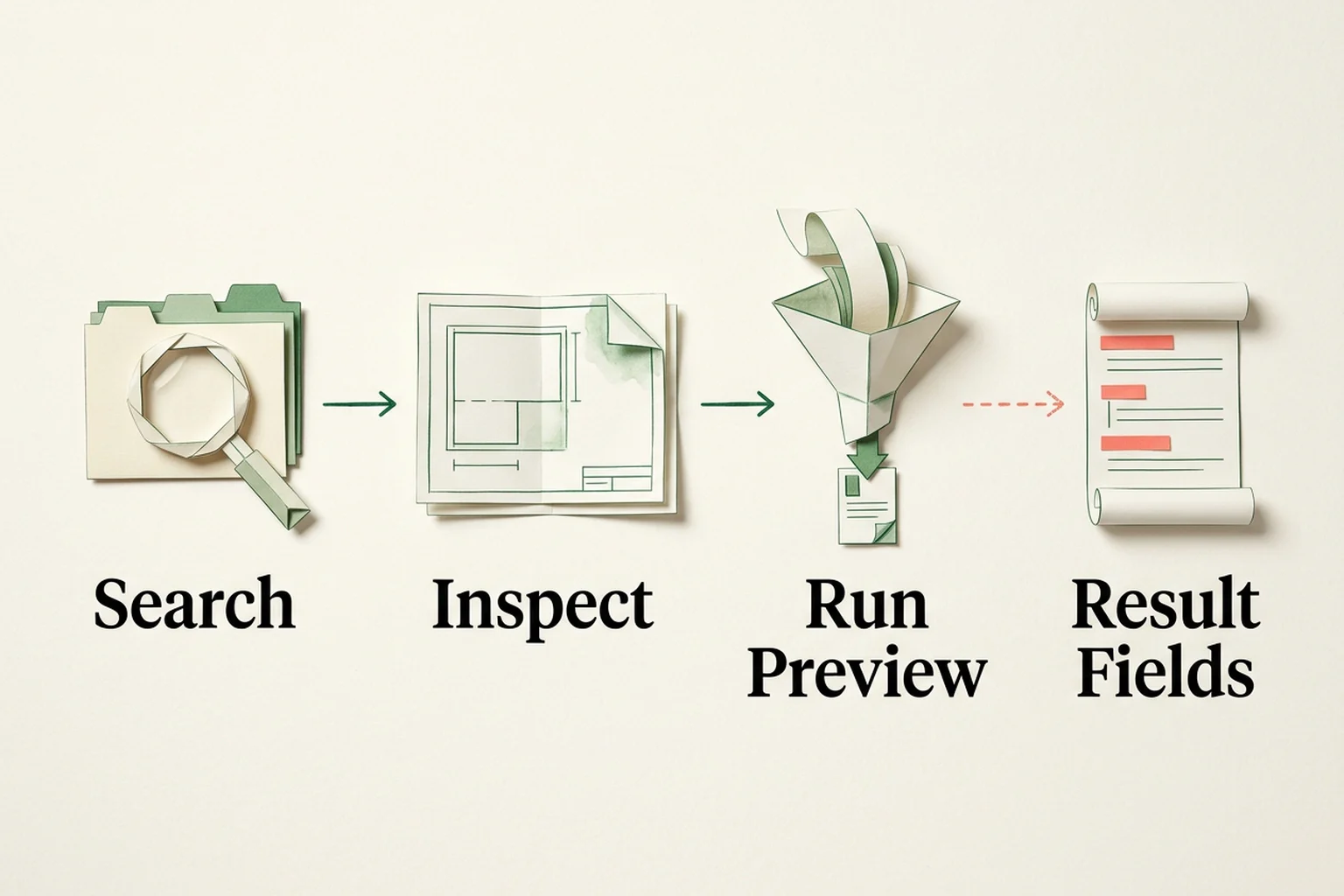
BeatAPI MCP's four-stage execution loop: free Search and Inspect, bounded Run Preview with idempotency, and optional 1-hour free Result Fields retrieval.
Treat a client's "connected" indicator as a starting point rather than proof of readiness. Verify the four contract boundaries below in sequence before scaling a workflow (see the BeatAPI MCP end-to-end setup and troubleshooting guide for client-specific diagnostics):
1. Configure the remote MCP endpoint with an environment-backed key. On Codex, Claude Code, or Cursor, point the client to https://beatapi.io/mcp and inject BEATAPI_API_KEY from the process environment rather than committing secrets into config files:
Ask the agent to list the exact tools exposed in the current session and confirm capabilities_search, capabilities_inspect, and capabilities_run appear before starting any paid call.
2. Search for candidate actions for free. Query in English or Chinese by platform and task with kind: "data". Copy the exact returned reference (never fabricate an action ID from a platform name):
{
  "query": "tiktok user profile",
  "kind": "data",
  "limit": 5
}
3. Inspect the contract, readiness, and live price for free. Call capabilities_inspect on the selected reference before spending balance:
Verify four fields in the response: required inputs in input_schema, current USD price and billing_unit in pricing, execution.mode (sync for social data actions, meaning no polling loop), and readiness (ready publishes input, output, and price; runnable runs with documented inputs and price while output fields are read from the response; listed cannot execute via Run). Store the 16-character schema_hash so repeated calls in the same workflow can skip redundant inspections unless the hash changes.
4. Execute one bounded preview run with an idempotency_key. BeatAPI MCP defaults capabilities_run starts to view: "preview", lifting the primary list to items (default 10, maximum 50) and trimming oversized strings so raw social JSON does not crowd out reasoning context:
Inspect isError first—BeatAPI returns gateway 4xx/5xx responses as MCP tool results with isError: true over HTTP 200 so the model can read the error JSON and self-correct—then retain request_id and usage. If the preview is marked truncated and you need complete records or specific keys, do not re-run start; call operation: "result" with the same API key, original reference, request_id, and optional fields (such as ["items[].title", "items[].url"]) free within one hour.
Under BeatAPI's documented Social Data billing contract, capabilities_search, capabilities_inspect, 1-hour operation: "result" fetches, and failed calls do not consume credits. Standard request-billed social actions are commonly listed at $0.003 per successful request, while creator-billed actions (creator.discover and creator.contacts) have been observed at $0.006 per creator with a minimum of one creator unit even on a successful empty response; always verify the live quote returned by capabilities_inspect before running a batch. When a call returns an empty collection or an error envelope, use the empty-result five-step diagnostic and the failed-call pricing reconciliation guide to separate outages, empty matches, and billable units cleanly.
FAQ: Social media data MCP architecture
Why does exposing 1,000+ static social media tools degrade AI agent accuracy?
Injecting hundreds or thousands of parallel social media endpoint schemas into the initial prompt increases naming collisions—such as repeated profile_get, posts_list, and comments_list actions with incompatible platform identifiers—and dilutes attention across irrelevant parameter trees. Anthropic's internal MCP evaluations measured accuracy gains from 49% to 74% on Claude Opus 4 and from 79.5% to 88.1% on Claude Opus 4.5 after moving from upfront loading to on-demand tool discovery.
Does scoping a static MCP tool list by platform remove the need for dynamic Search-Inspect-Run?
Scoping tools/list down to 10–15 tools works well when an agent always stays inside one or two predetermined platforms. It does not solve ad-hoc multi-platform research where prompts jump across new networks mid-session, nor does URL filtering by itself provide pre-run live pricing checks or default response-preview truncation.
Why do MCP client best practices warn that dynamic list_changed updates break Prompt Caching?
Model providers cache the prompt prefix including the serialized tools array to cut input token costs and latency on multi-turn sessions. Adding, removing, or reordering tool definitions mid-conversation via notifications/tools/list_changed changes the prefix bytes and triggers a cache miss. Routing calls through a fixed meta-tool set—such as BeatAPI's 7-tool manifest—keeps the tools array unchanged across turns.
Do the extra Search and Inspect calls make dynamic Search-Inspect-Run slower or more expensive?
On the first encounter with an unfamiliar action, Search and Inspect add one to two tool round trips, though both calls are free on BeatAPI MCP and their compact 6.4 KB meta-tool footprint avoids paying upfront schema token costs on every turn. For repeated calls to the same verified action, caching the contract by schema_hash skips re-inspection, and fixed recurring jobs should run directly over REST.
How do I tell whether an empty social media MCP response consumed credits?
Never judge billing solely from HTTP 200 or from whether useful rows appeared in your application. Check isError in the MCP tool result, the gateway status envelope, request_id, and usage: failed calls do not consume credits on BeatAPI, whereas successful request-billed calls consume one request unit and successful empty responses on creator-billed endpoints (creator.discover and creator.contacts) still consume a minimum of one creator unit.
When should a team move a social media data workflow from MCP to direct REST APIs?
Keep MCP for interactive exploration, coding-agent prototyping, and research agents that decide which platforms to query at runtime. Once a workflow settles into a fixed account list, deterministic pagination, and scheduled daily collection, call POST /v1/social-data/call directly from application code to remove LLM inference latency, control concurrency explicitly, and simplify cost auditing.
Next step: run a 10-minute baseline check
Before locking an MCP architecture for production agents, test one realistic multi-step task—such as finding a public post by keyword and retrieving its first 10 comments—and measure three signals: initial tools/list schema size in context, whether long comment payloads truncate safely with on-demand field retrieval, and whether the server lets your agent verify required inputs and live pricing before spending balance. If your workflow spans global and Chinese social networks or pairs social listening with SEO, web search, and model generation, start with the BeatAPI Social Data directory and the BeatAPI MCP integration guide to verify your first bounded request.