You can give Claude Code live keyword volume, competitor top pages, backlinks, and Domain Rating by adding a remote HTTP MCP entry to .mcp.json in your project root. Before you copy a config snippet, three practical constraints decide whether the setup actually saves time or burns money: official Ahrefs and Semrush MCP servers require $129–$199/month paid plans, connecting heavy MCP servers eats tens of thousands of context tokens before your first prompt, and unbounded list queries can multiply your per-call bill in a single follow-up turn.
If your team already pays for Ahrefs or Semrush every month, connect their official MCP and keep an eye on row limits. If you only pull SEO data during content sprints or competitor research and do not want another monthly seat, BeatAPI SEO Data API over remote MCP (https://beatapi.io/mcp) is a cleaner fit: you pay per call and per returned row from a prepaid USD balance (domain-rating costs $0.005, a capped competitor top-page and keyword audit runs $0.05–$0.07), the server exposes only 7 fixed tools so it does not bloat Claude Code's context window, and the same API key lets Claude Code call web_read ($0.002/URL) to inspect a competitor's top-ranking article in the same conversation.
Quick answer
- Choose by existing spend, not hype: Use Ahrefs MCP (Lite from ~$129/month) or Semrush MCP (Starter from ~$199/month) if you already hold those subscriptions; use BeatAPI remote MCP when you want pay-as-you-go SEO data with zero monthly seat fee and no local Node or Python server to run.
- Scope the config to your project: Put
.mcp.json in your content or growth repository (or pass --scope project) instead of installing globally (--scope user), so coding repos never carry SEO tool overhead.
- Run a free preflight check first: BeatAPI exposes 12 SEO endpoints through
capabilities_search, capabilities_inspect, and capabilities_run; searching and inspecting parameters and live quotes cost $0, so confirm limit before approving a paid run.
- Use REST scripts for bulk jobs: If you pull thousands of rows into a database on a nightly schedule, skip interactive chat and call
POST /v1/seo/* from a plain Python or Node script with an Idempotency-Key header.
Pick the right SEO MCP before you touch any config file
Four SEO MCP options cover most Claude Code setups today. They all return keyword and backlink metrics; the real differences are monthly minimums, context-window footprint, and whether your agent can also read the pages it discovers.
| Option | Minimum spend | Connection method | Best fit & practical trade-off |
|---|
| Ahrefs MCP | Paid Lite plan (~$129/month, 200,000 API units) | Remote HTTP + Ahrefs account auth | Best if you already live in Ahrefs; Lite caps requests at 100 rows with a 50-unit minimum per call, so multi-step agent loops drain quota fast. |
| Semrush MCP | Qualifying plan (Starter ~$199/month, 50,000 API units) | Remote HTTP + /mcp OAuth flow | Best for existing Semrush teams; Traffic and Trends datasets require separate paid add-ons. |
| DataForSEO MCP | Pay-as-you-go ($50 minimum credit deposit) | Hosted HTTP or local npx stdio | Strong raw multi-module coverage (SERP, Labs, Backlinks), but wide tool lists add context overhead unless you trim enabled modules. |
| BeatAPI MCP | Pay-as-you-go, no monthly seat (domain-rating $0.005/call) | Remote HTTP (https://beatapi.io/mcp) + Bearer key | Best for lean teams and multi-step Claude Code briefs; 7 fixed tools keep startup tokens small and the same key unlocks web_read and web_search. |
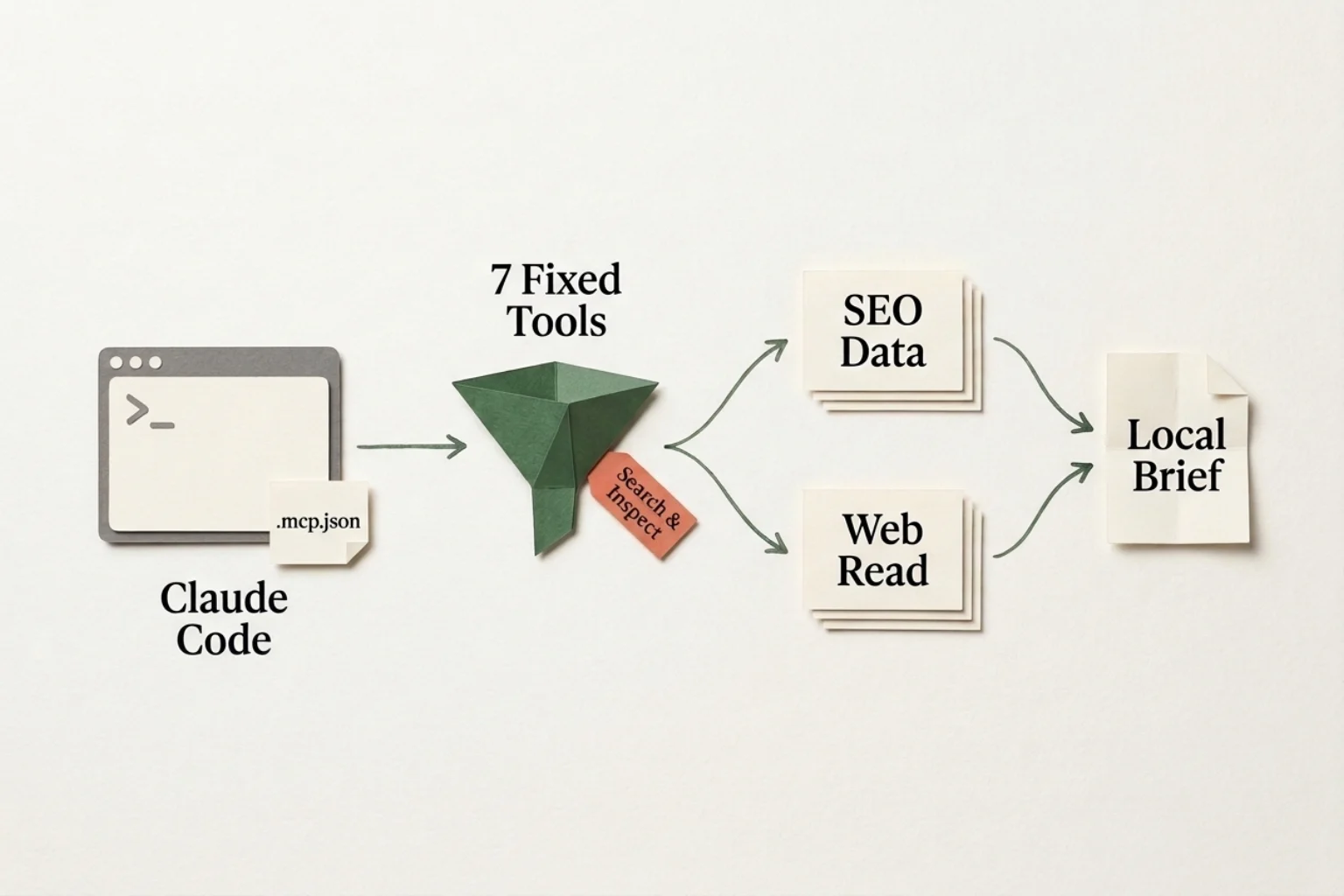
Across r/ClaudeCode and GitHub discussions, the most common complaint about MCP is not installation—it is the context tax. Connecting large static servers dumps dozens of verbose JSON tool schemas into every turn before you type a word, sometimes burning 20,000 to 60,000 tokens upfront. BeatAPI avoids that trap by keeping a 7-tool manifest (3 generic router tools plus 4 web tools) that discovers and inspects all 12 data:seo.* capabilities only when you ask for them.
Connect BeatAPI to Claude Code in three minutes (and avoid three common setup traps)
Export your key in your shell first, then add a project-scoped .mcp.json file at the root of your repository. Keeping the key in an environment variable lets your team commit .mcp.json safely without exposing secrets in Git.
export BEATAPI_API_KEY="your_beatapi_key"
{
  "mcpServers": {
    "beatapi": {
      "type": "http",
      "url": "https://beatapi.io/mcp",
      "headers": {
        "Authorization": "Bearer ${BEATAPI_API_KEY}"
      }
    }
  }
}
If you prefer the CLI over editing JSON by hand, register the same project-scoped entry with one command:
claude mcp add --transport http --scope project beatapi https://beatapi.io/mcp \
  --header "Authorization: Bearer ${BEATAPI_API_KEY}"
Run claude mcp list to verify the server state. Based on Anthropic's Claude Code MCP documentation, three small mistakes cause almost every first-time failure:
- Omitting
"type": "http" in .mcp.json: Whenever a JSON entry includes a url without type, Claude Code assumes it is a local stdio process, skips it, and prints MCP server "beatapi" has a "url" but no "type".
- Stopping at
Pending approval: Project-scoped .mcp.json servers are never auto-trusted on first load. Open claude interactively inside that folder once and approve the server; only then will claude mcp list switch to Connected.
- Trailing whitespace or an unset shell variable: Pasting an API key with a trailing newline triggers
Leading or trailing whitespace in: headers.Authorization, and forgetting export BEATAPI_API_KEY leaves ${BEATAPI_API_KEY} unexpanded so authentication fails.
Once beatapi shows as connected, start with a zero-cost read-only check so you confirm tool discovery before spending a cent:
Use BeatAPI MCP capabilities_search to find SEO tools, then run capabilities_inspect on data:seo.keyword_ideas and data:seo.domain_rating to show required inputs and live prices. Do not call capabilities_run yet.
For full client flags, permission rules, and other editors, see the Claude Code integration guide and BeatAPI Integrations.
How per-call and per-row SEO pricing works—and how to cap every run
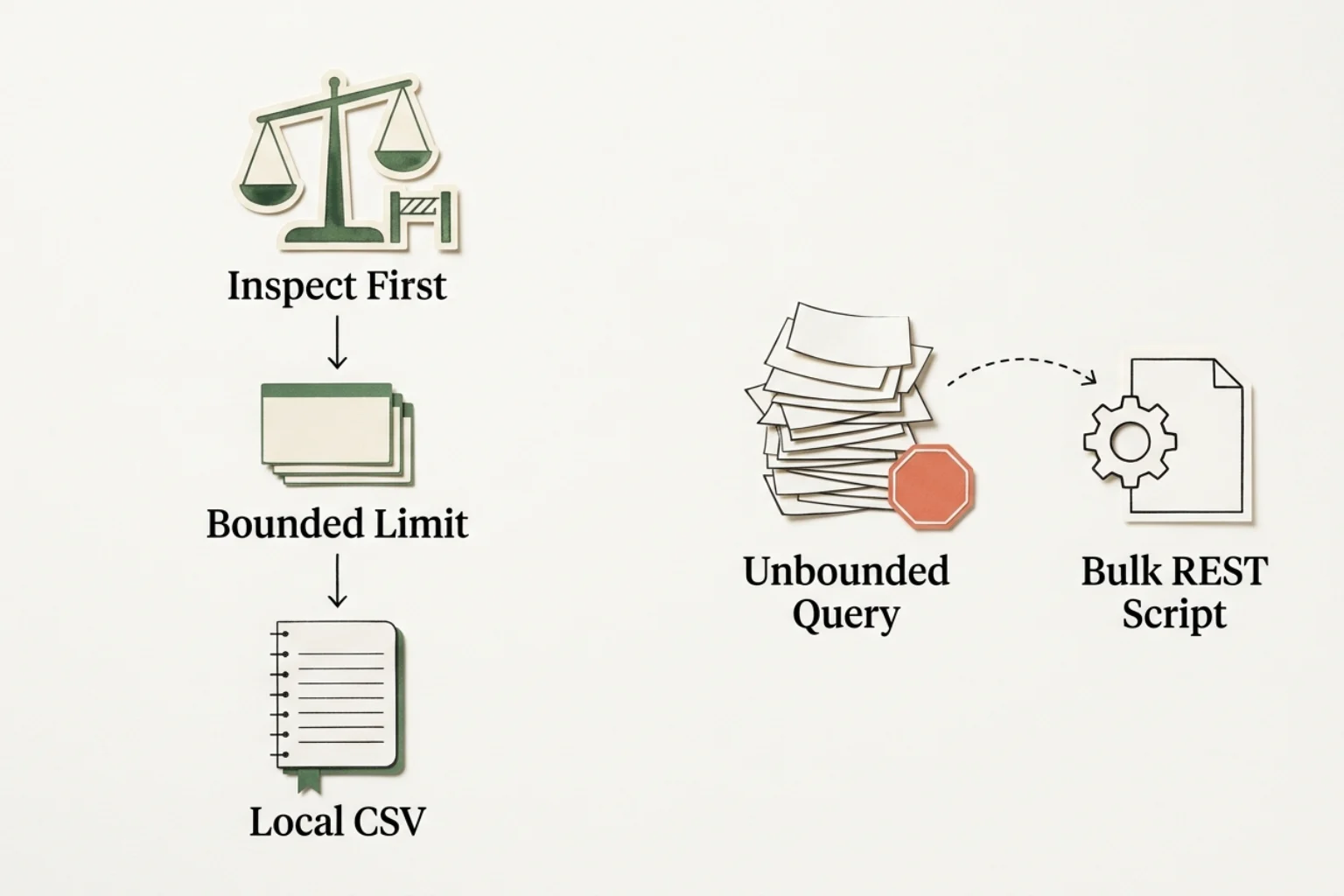
BeatAPI SEO Data API covers 12 endpoints split across three simple billing shapes. The one rule that protects your balance is setting an explicit limit on list endpoints—because list tools charge a small base fee per call plus a tiny fee per returned row.
| Task group | Capability references (data:seo.*) | Public retail rate | Example capped call |
|---|
| Keywords & domain lists (7 tools) | keyword_overview, keyword_ideas, keyword_difficulty, domain_overview, ranked_keywords, top_pages, competitors | $0.018 / call + $0.0003 / row | limit: 20 (20 rows) = $0.024 |
| Backlinks (2 tools) | backlink_summary, backlinks | $0.035 / call + $0.0002 / row | Summary (1 row) = $0.0352; 20 backlinks = $0.039 |
| Domain Rating | domain_rating | $0.005 / call | $1 buys 200 domain checks |
| DR History | domain_rating_history | $0.004 / month | 6 months of history = $0.024 |
| Site Traffic | site_traffic | $0.005 / quarter | 4 quarters of history = $0.020 |
Check BeatAPI pricing if you need live quotes alongside model or social-data rates. In day-to-day Claude Code prompts, keep three habits in every request: name the two-letter country code (us, gb, jp), cap limit (10 or 20 rows), and ask Claude to print the estimated total before running.
Three copy-ready Claude Code workflows with real cost math
Connecting an MCP server only pays off when the output lands directly in your working files. Each prompt below runs in a single Claude Code turn and writes structured output straight to your repository.
1. Build a prioritized keyword sheet (~$0.045)
Pull 20 related ideas with keyword_ideas ($0.024), score difficulty on the top 10 with keyword_difficulty ($0.021), and save a sorted CSV ready for editorial planning.
Use BeatAPI SEO tools to fetch keyword_ideas for "ai video api" in country "us" with limit 20. Take the top 10 terms by search volume, check keyword_difficulty for those 10, sort by high volume and low difficulty, and save the result to ./seo-briefs/ai-video-api-keywords.csv. Print the estimated call cost at the end.
2. Find a competitor's top organic pages and read their actual article (~$0.068)
Pure SEO tools stop at URLs and traffic estimates, forcing you to open browser tabs manually. Because the same BeatAPI key unlocks BeatAPI Web Search API (web_read at $0.002 per readable URL), Claude Code can pull domain_overview ($0.0183), top_pages (limit 10, $0.021), and ranked_keywords (limit 20, $0.024), then immediately read the top two ranking articles as clean Markdown ($0.004) to map heading gaps.
For bare domain competitor.com in country "us", run BeatAPI domain_overview, top_pages (limit 10), and ranked_keywords (limit 20). Pick the top 2 organic content URLs, read both pages with web_read, and write ./seo-briefs/competitor-gap.md comparing their H2 structure and listing concrete angles they missed.
3. Vet an outreach or backlink partner before pitching (~$0.064)
A single Domain Rating snapshot hides sites that recently lost authority. Combining domain_rating ($0.005), backlink_summary ($0.0352), and six months of domain_rating_history ($0.024) flags sudden drops before you spend time writing a guest post.
Check target.com with BeatAPI domain_rating, backlink_summary, and 6 months of domain_rating_history. Summarize whether authority is steady or declining and flag any abrupt backlink anomalies.
Four real-world gotchas—and when not to use MCP at all
- Pass bare domains and two-letter country codes: Send
example.com, never https://example.com/ or a subpage path. Use us, gb, or jp rather than USA or UK, or parameter validation will reject the call.
- Brand-new terms often return null or zero search volume: Keyword indexes need weeks to accumulate monthly averages. When a newly launched model or tool name returns empty volume, that is a normal coverage lag—not a broken endpoint. Run
web_search ($0.005/call) on the same MCP connection to check live discussion instead.
- Guard retries and reuse
request_id: When you move a workflow into a script calling POST /v1/seo/*, always send an Idempotency-Key header so timeout retries never double-bill. Inside Claude Code, reuse an existing request_id rather than rerunning the exact same query.
- Skip interactive MCP for bulk nightly pulls: If your pipeline scrapes 500 domains or 10,000 keyword rows every night into a warehouse, do not drive it through an interactive Claude Code chat—you will pay unnecessary LLM reasoning tokens on top of data calls. Have Claude Code write a small Python script against
POST /v1/seo/* and schedule that script instead.
Start small: add .mcp.json to one content repository, run a free capabilities_inspect check, and test Workflow 2 against a single competitor for under seven cents. When you switch back to pure feature coding, toggle the server off for that project in Claude Code's /mcp menu so it adds zero overhead.
FAQ
Does connecting BeatAPI SEO MCP change which Claude model Claude Code uses?
No. Adding an MCP server only gives Claude Code external tools to call. Your existing Claude subscription or API model configuration stays untouched.
How do I stop Claude Code from running dozens of expensive SEO calls by accident?
Combine two guardrails: always include limit: 20 and "run capabilities_inspect first and confirm cost before executing" in your prompt, and fund BeatAPI with a small prepaid USD balance so spend has a hard ceiling with no surprise monthly overage.
Can I copy this exact .mcp.json config into Codex?
The remote endpoint (https://beatapi.io/mcp) and all 12 data:seo.* tools are identical, but Codex reads ~/.codex/config.toml using TOML syntax and bearer_token_env_var instead of .mcp.json. Check the Codex setup guide for the exact snippet.
What is the cheapest way to screen a list of 50 domains for authority?
Ask Claude Code to call only data:seo.domain_rating ($0.005 per domain, or $0.25 for 50 domains) instead of pulling full backlink tables, and inspect backlinks only on the few domains that pass your threshold.