Kuaishou, the company behind the short-video platform of the same name, develops Kling AI, its suite of generative video and image tools. Kling 4.0 is the fourth-generation video model in that lineup and the successor to Kling 3.0. The API is live and can generate 3 to 30 seconds of video with native audio in one request. Use keyframes to pin down specific frames, or guide the shot with image, video, or audio references. Kling Image 4.0 is a separate model for still images.
BeatAPI has the lowest verified regular rates among these seven platforms for matched Kling 4.0 requests. With text input only, BeatAPI charges $0.15 per output second at 720p and $0.23 at 1080p. The official Kling AI API charges $0.157 and $0.235, respectively. A 10-second 1080p clip with generated audio comes to an estimated $2.30 on BeatAPI and $2.35 on the official API. That comparison excludes promotions and applies only where resolution, duration, and input type match.
For storyboard previews or testing different ad openings, start at 720p. A 10-second Kling 4.0 clip from text costs an estimated $1.50 at BeatAPI's regular rate.
For a product demo with dialogue, budget for the clip itself. The Kling 4.0 rates here include native audio; Kling 3.0's silent tier does not carry over.
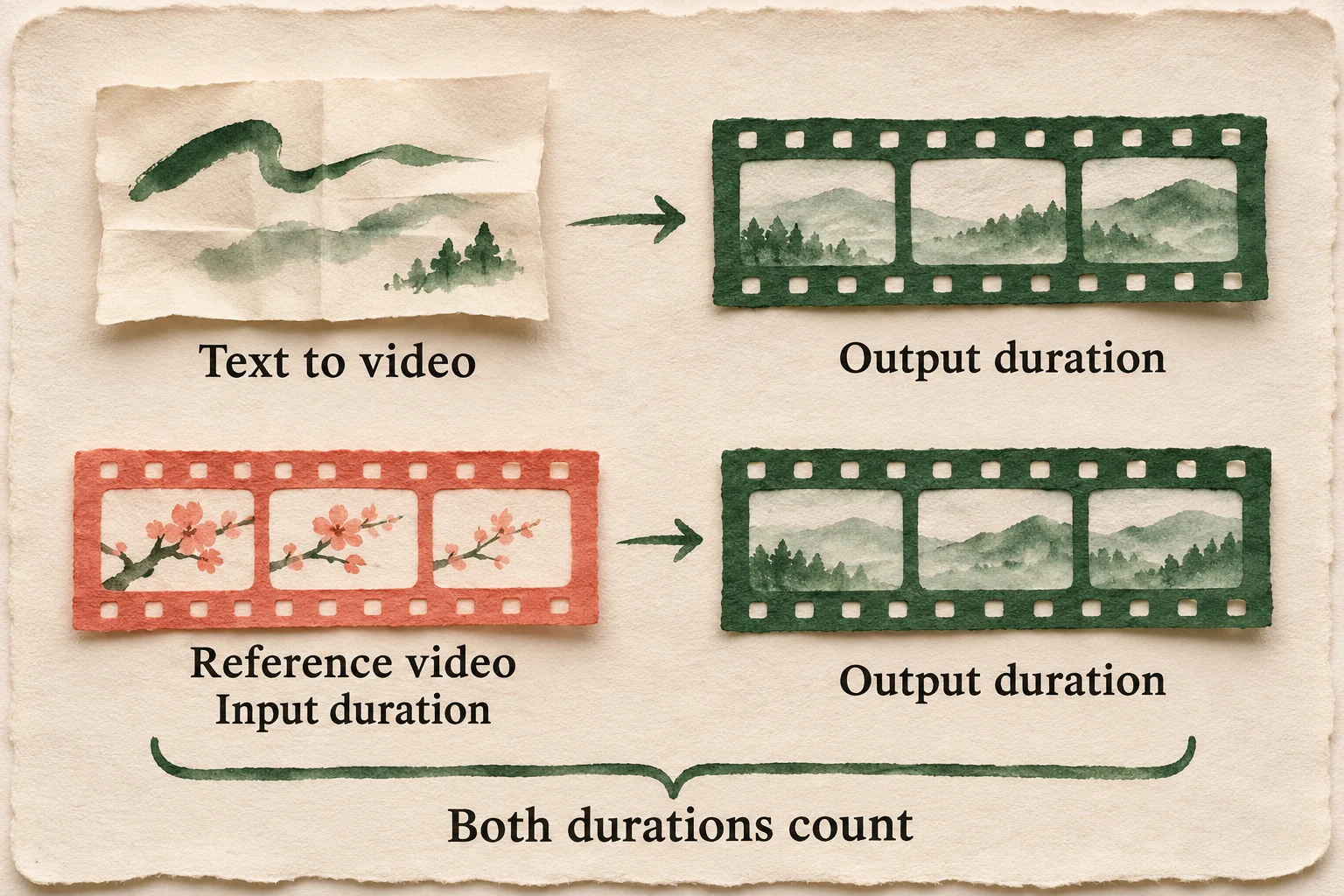
To borrow camera movement from a reference clip, budget by billable duration, not just the finished clip. A 5-second reference and a 10-second 1080p output cost an estimated $2.80 on BeatAPI and $2.82 on the official Kling AI API.
Kling 4.0 API list prices across seven platforms
All rates are in USD, with native 720p / 1080p shown in that order. Text-to-video supports 3 to 30 seconds of output, with audio included. Rates for video input apply only to routes that accept a reference or source video.
Atlas Cloud's rates are for native 720p and 1080p text-to-video. They exclude the 4K/HDR mentioned in the product overview and Atlas ESR enhancement. The absence of a comparable video-input quote does not mean video input is free.
First payment and promotions
First payment. The smallest official Kling AI flagship trial pack lists for $10 and was offered at $9, with 64 API units valid for 30 days. The 180-day packs have separate volume discounts. Runway Dev requires a $10 initial payment, and Atlas Cloud has a $25 minimum top-up. Those amounts are not the cost of a single generation.
Promotions.Runway Dev's 20% discount runs through November 30, 2026 UTC. WaveSpeedAI listed 15% off text-to-video and Atlas Cloud listed 30% off native text-to-video, with no confirmed end date in either quote. The regular-price comparisons exclude these discounts, top-up bonuses, and package discounts.
What does a 10-, 20-, or 30-second clip cost?
A 20-second Kling 4.0 clip with native audio costs an estimated $3.00 on BeatAPI versus $3.14 on the official Kling AI API at 720p. At 1080p, the same job comes to $4.60 versus $4.70.
The estimates below assume a 16:9 clip generated from text, with native audio and one successful output at the requested duration. They use regular rates, shown to the nearest cent with Runway's whole-credit rounding applied. They are not actual invoices and exclude retakes, enhancement, taxes, and promotions.
Platform
720p · 10 sec
720p · 20 sec
720p · 30 sec
1080p · 10 sec
1080p · 20 sec
1080p · 30 sec
BeatAPI
$1.50
$3.00
$4.50
$2.30
$4.60
$6.90
Kling AI
$1.57
$3.14
$4.71
$2.35
$4.70
$7.05
fal
$1.57
$3.14
$4.71
$2.35
$4.70
$7.05
Replicate
$1.57
$3.14
$4.71
$2.35
$4.70
$7.05
WaveSpeedAI
$1.57
$3.14
$4.71
$2.35
$4.70
$7.05
Runway Dev
$1.57
$3.14
$4.71
$2.35
$4.70
$7.05
Atlas Cloud
$2.04
$4.08
$6.12
$3.06
$6.11
$9.17
For text-only jobs at BeatAPI's regular 1080p rate, one 15-second clip and three 5-second clips both cost an estimated $3.45. One 30-second clip and three 10-second clips both cost $6.90. That's with the same total generated duration, one successful take per clip, and no extra footage for trimming. Splitting a sequence lets you keep the shots that work and redo only the ones that don't. It doesn't guarantee better video quality or a lower bill.
What changes when you add a reference video?
For the comparable Kling 4.0 reference-video routes below, billable seconds = output seconds + max(total video-input seconds, output seconds). A 10-second output with a 5-second reference is billed for 20 seconds; with a 15-second reference, it's billed for 25 seconds. Once the input is shorter than the output, trimming it further won't reduce the billable duration.
With a reference video, the input side of the calculation has a floor: the output duration.
Estimated USD per successful 10-second 1080p clip with native audio, using one whole-second reference clip where shown:
Platform
Text only
5-second video reference
15-second video reference
BeatAPI
$2.30
$2.80
$3.50
Kling AI
$2.35
$2.82
$3.53
fal
$2.35
$2.82
$3.53
Replicate
$2.35
$2.82
$3.53
WaveSpeedAI
$2.35
$2.82
$3.53
Runway Dev
$2.35
$2.82
$3.53
When you submit multiple reference clips, use their combined input duration. On BeatAPI, each ordinary reference video can run 2 to 30 seconds, with a maximum of 30 seconds across those clips. Each element created from video counts as 8 seconds of video input, regardless of the length of the source used to create it.
Choose a platform for the footage you need
Use keyframes when a shot needs to open or end on a specific composition. Use reference video when the shot needs to follow an existing movement or camera move. The Kling 4.0 guide to keyframes and references explains what each approach controls.
What you're making
Where to start
What to budget for
A 15- to 30-second product demo from stills, with audio
BeatAPI Kling 4.0
Use keyframes to lock specific frames. To guide both product appearance and camera motion, use a reference image plus a reference video; BeatAPI also supports elements in reference mode. BeatAPI does not allow keyframes and reference assets or elements in the same request. Images alone use the output-second rate; adding a reference video switches to video-input billing.
A batch of 30-second 1080p clips with audio
BeatAPI Kling 4.0
For text-only requests, estimate $6.90 per successful clip at BeatAPI's regular rate, versus $7.05 through the official Kling AI API. Include expected retakes in the batch budget.
A small change to existing footage
Official Kling AI Omni, fal's edit route, or Runway Dev video-to-video
Choose a route that supports editing and check how it meters the source and output. The part of the shot you change isn't the billing unit.
A low-cost motion test at 720p, 3 to 20 seconds
Kling 4.0 Flash
The official Kling AI API and Runway Dev list $0.094 per output second without video input. Flash is a separate model, not a drop-in replacement for delivery at 1080p, clips longer than 20 seconds, or shots that need middle or end keyframes.
Kling 4.0 API pricing FAQ
If I change two seconds of a 10-second shot, do I pay for just those two seconds?
No. On fal's kling/v4/video-to-video/edit route, the output defaults to the source length: a 10-second source plus a 10-second 1080p output is 20 billable seconds, or an estimated $2.82 at the regular rate.
What if a 30-second take fails, gets canceled, or isn't good enough to use?
BeatAPI bills successful generations even if you discard them and returns the amount reserved for a failed generation. How user-initiated cancellations are settled is unconfirmed, so don't count on the failed-job refund applying. Two successful runs of the same 30-second 1080p text-to-video job cost an estimated $13.80 at the regular rate, even if you keep only one take.
Can I save money by turning off audio?
No cheaper silent tier is included in the rates compared here. BeatAPI has no mute switch at generation time; remove the audio track in post if the deliverable needs to be silent.
Does creating a custom voice for a product clip cost extra?
Yes. The official Kling AI API charges separately per custom voice creation. Native audio generated with an ordinary clip is still included in the video rate.
Does a lower-priced platform deliver better or faster Kling 4.0 clips?
You can't infer quality or speed from the provider name or price. This comparison did not run a seven-platform benchmark using the same footage; before choosing a provider, test a small batch with the same prompts and reference inputs supported by every provider you're evaluating.
Do these rates apply to product hero images?
No. Kling Image 4.0 makes still images for uses such as product hero shots. The rates here apply when Kling 4.0 generates video, including when a product image is the starting point.