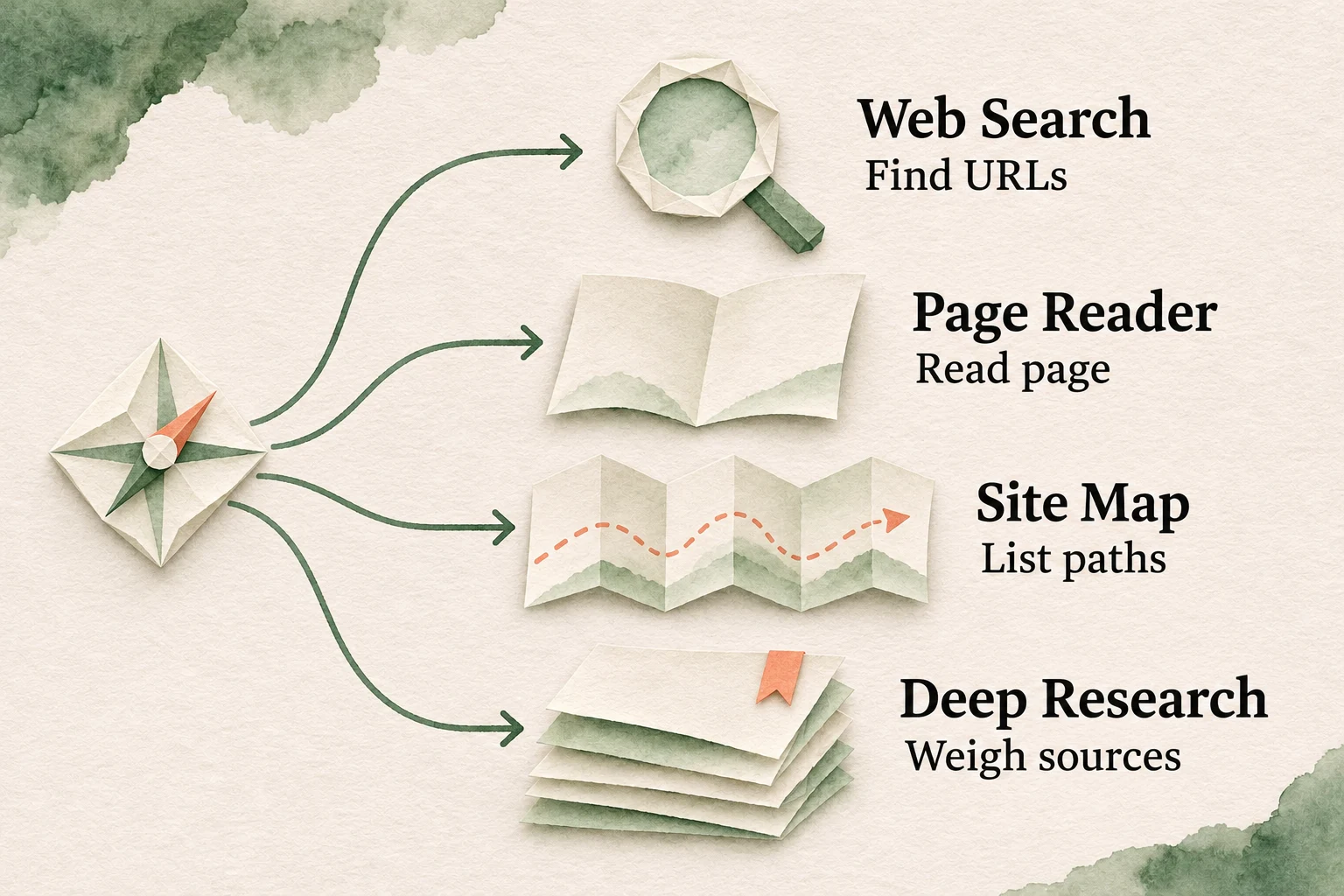
When you give an AI agent live web access, four distinct operations handle four separate jobs. Web Search returns candidate URLs and short snippets for a query. Page Reader extracts clean Markdown or plain text from specific public URLs. Site Map discovers internal URLs starting from a single public page on a target domain. Deep Research runs multiple searches and page reads in one asynchronous job and returns cited research notes.
BeatAPI Web Search API exposes these four operations as four REST endpoints under one BeatAPI API key. You can call them directly over HTTP or connect the same four tools to Claude Code, Codex CLI, and Cursor through BeatAPI MCP.
Quick answer
- Track new competitor pages or ingest a documentation site with BeatAPI Site Map and BeatAPI Page Reader. Filter target sections with
select_paths, diff against your previous URL list, and read only the new pages instead of re-crawling an entire domain.
- Verify pricing updates, version numbers, or official policies with BeatAPI Web Search followed by BeatAPI Page Reader. Search snippets omit conditions and
type: "news" results carry no snippet field; reading the actual page with a focused query keeps citations accurate and input tokens small.
- Reserve BeatAPI Deep Research for multi-source comparisons and public feedback synthesis.
POST /v1/web/research costs $0.05 and takes 30 seconds to 3 minutes; checking one known official site with POST /v1/web/search plus POST /v1/web/read costs under $0.01 and finishes in a few seconds.
- Failed reads and empty maps cost $0, while partial research runs are billed. BeatAPI charges nothing for URLs listed in
failed[], empty web/map responses, or 503 responses across all four endpoints. POST /v1/web/research bills $0.05 for both complete and partial runs, and only sources marked read_status: "read" should be cited.
Case 1: Monitor competitor new pages and SEO moves (Site Map + Page Reader + SEO Data API)
Tracking new URLs inside a competitor's high-value sections is a straightforward way to spot new comparison pages, landing pages, and product launches without scraping the whole site every week. You pull a fresh list of URLs for the sections you care about, diff it against last week's snapshot, and inspect only what changed.
Monitoring sitemap.xml timestamps (<lastmod>) alone often triggers false alerts. When a CMS such as WordPress or Webflow updates a global header or footer, it refreshes <lastmod> across every page in the sitemap. Comparing newly added URLs first, then reading only those new pages, eliminates that noise.
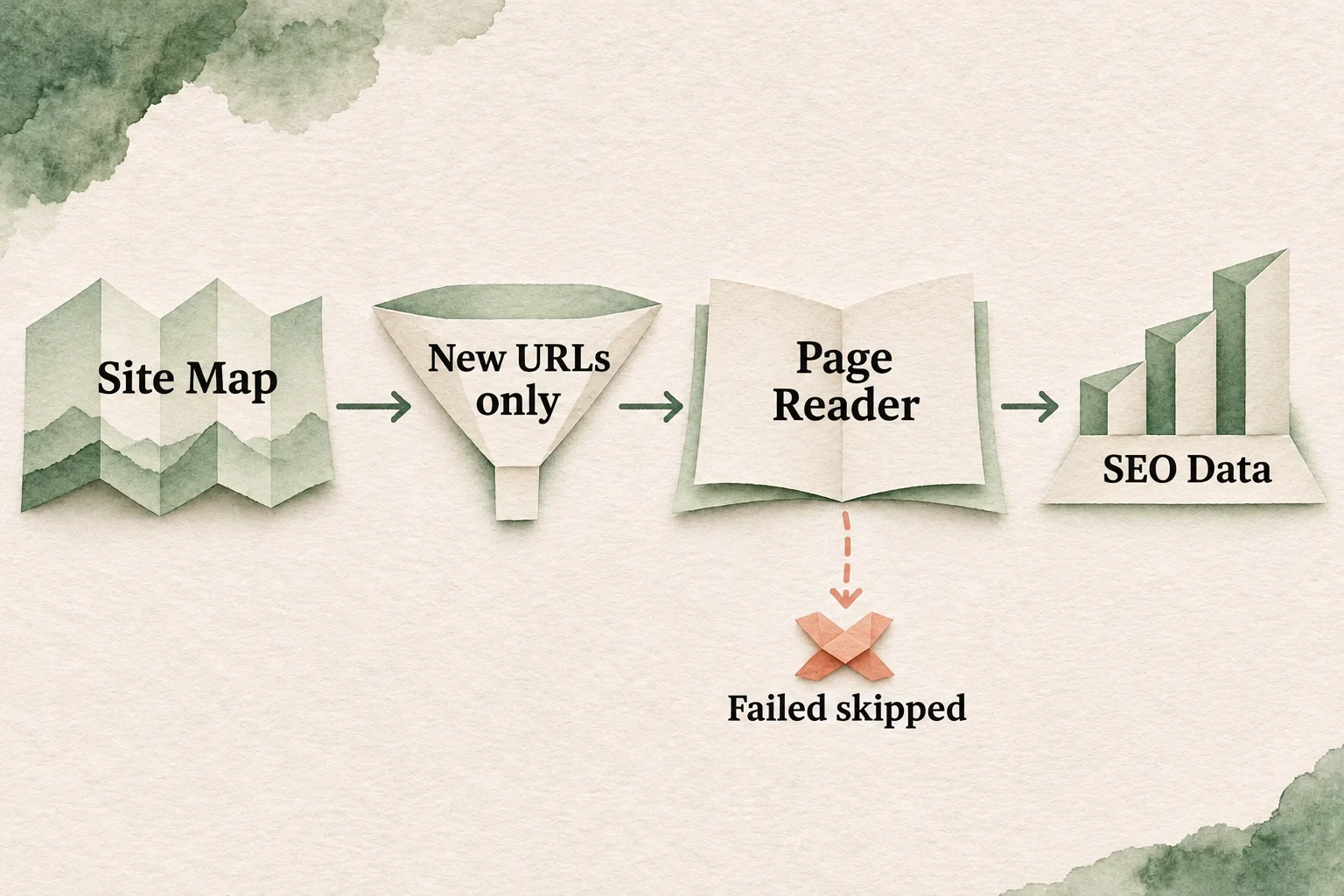
A weekly competitor monitor on BeatAPI runs in three steps:
- List target sections with BeatAPI Site Map and compute the diff. Call
POST /v1/web/map with select_paths scoped to high-signal directories (such as ["/blog/.*", "/alternatives/.*", "/integrations/.*"]), max_depth: 2, and limit: 50. Compare urls against last week's saved JSON file to isolate newly published URLs.
- Read only the newly added pages with BeatAPI Page Reader. Pass the new URLs (for example, 5 pages) to
POST /v1/web/read with format: "markdown" to extract headings, claims, and target comparisons. If a target site blocks a request, BeatAPI Page Reader places that URL in failed[] with reason: "blocked" at $0 cost instead of passing a 403 block page into your LLM prompt as article text.
- Check keyword demand with BeatAPI SEO Data API. Using the same BeatAPI API key, call BeatAPI SEO Data API (
/v1/seo/keyword-overview or /v1/seo/top-pages) to pull search volume and difficulty for the topics those new pages target, then send a concise digest to Slack or your local report folder.
curl -sS https://api.beatapi.io/v1/web/map \
  -H "Authorization: Bearer $BEATAPI_API_KEY" \
  -H "Content-Type: application/json" \
  -d '{
    "url": "https://competitor.example",
    "select_paths": ["/blog/.*", "/alternatives/.*"],
    "exclude_paths": ["/tag/.*", "/page/.*"],
    "max_depth": 2,
    "limit": 50
  }'
POST /v1/web/map returns at most 100 deduplicated URLs per call and follows links up to max_depth: 3, so it does not guarantee full coverage of a large domain. If a starting page builds its links strictly with client-side JavaScript, BeatAPI Site Map returns an empty urls list with a note explaining why and charges $0. For domains with thousands of pages, parse the site's sitemap.xml to isolate new URLs and pass those URLs directly to POST /v1/web/read.
Case 2: Verify external pricing or API changes while capping LLM token cost (Web Search + Page Reader)
In web-enabled agent loops, downstream LLM input tokens are usually the largest cost driver. Feeding raw HTML into a model fills the context window with navigation bars, scripts, and styling markup. Feeding only two-line search snippets causes the model to guess missing conditions, effective dates, or pricing tiers.
Separating link discovery from page extraction solves both problems:
- Find the official source with BeatAPI Web Search. Call
POST /v1/web/search with include_domains locked to the vendor's domain and max_results set to 3 or 5. Pick the matching type (web, news, images, videos, scholar, patents, shopping, or places). Keep two field differences in mind: news results include no snippet field, and places results include no url field. When both country and language are omitted, queries in Chinese, Japanese, or Korean search in that language and region automatically.
- Extract only relevant passages with BeatAPI Page Reader. Pass 1 to 10 selected URLs to
POST /v1/web/read with format: "markdown", a query of up to 400 characters, and a bounded max_chars (default 20000, range 500 to 100000). The endpoint returns only the Markdown sections relevant to your query.
curl -sS https://api.beatapi.io/v1/web/read \
  -H "Authorization: Bearer $BEATAPI_API_KEY" \
  -H "Content-Type: application/json" \
  -d '{
    "urls": ["https://spec.openapis.org/oas/v3.1.0"],
    "query": "webhooks object",
    "format": "markdown",
    "max_chars": 4000
  }'
The same discover-then-read split works when syncing third-party API documentation into Claude Code, Cursor, or a local RAG index: run POST /v1/web/map with select_paths: ["/docs/.*"], then batch the returned URLs in groups of up to 10 through POST /v1/web/read. Readable pages return in results[] while blocked pages land in failed[] at $0 cost. If a long page returns truncated: true, rerun POST /v1/web/read for that single URL with a higher max_chars or a narrower query.
Case 3: Run multi-source vendor or community research with verified citations (Deep Research + Page Reader)
When an autonomous research agent hits timeouts or blocked pages and silently omits those failures from a polished report, verifying every claim by hand takes longer than researching the topic yourself.
When a question requires weighing multiple independent sources (such as comparing policy changes across several vendors or summarizing public discussion after a release), call POST /v1/web/research. BeatAPI Deep Research runs multiple search and read steps in one job, typically taking 30 seconds to 3 minutes, and returns research_notes alongside up to 20 ranked sources[]. Set "include_x": true to include public posts on X; when omitted, X is searched only if the query mentions X, Twitter, or tweets.
Apply two client rules when calling POST /v1/web/research:
- Set a 90–100 second client timeout and handle HTTP 202 polling.
POST /v1/web/research holds the HTTP connection for up to 85 seconds (for example, pass curl --max-time 100). If the job runs longer than 85 seconds, BeatAPI Deep Research returns HTTP 202 with status: "running" and a next object. Send next to POST /v1/capabilities/run every 10 to 15 seconds until data.status is succeeded, then read data.output.
- Cite only
read_status: "read" sources and surface gaps. Treat research_notes as leads rather than verified facts. Each item in sources[] carries a read_status of read, snippet, cited, or failed; only read means BeatAPI Deep Research actually read the page. Because total returned page text per run is capped, a read source may omit content. Pass that URL to POST /v1/web/read ($0.002) whenever you need exact quotes. When top-level status is partial, keep partial_reasons in your final brief so coverage gaps stay visible.
Billing rule: POST /v1/web/research charges $0.05 for any successful run, whether status is complete or partial. Failed runs cost $0.
Cost breakdown across four real agent tasks
Using current public retail rates on BeatAPI Pricing (Web Search $0.005/call, Page Reader $0.002/readable URL, Site Map $0.001/returned URL, Deep Research $0.05/successful run), here is the exact web-endpoint cost for each workflow, excluding downstream LLM tokens:
| Agent task | Endpoint sequence | Example volume | Total web API cost |
|---|
| Weekly competitor section monitor | web/map + web/read (new pages only) | Map 50 URLs + Read 5 newly added pages | 50 × $0.001 + 5 × $0.002 = $0.0600 |
| Verify one API spec or pricing change | web/search + web/read | 1 Search call + Read 2 official pages | $0.005 + 2 × $0.002 = $0.0090 |
| Ingest 20 external doc pages to Markdown | web/map + batched web/read | Map 20 URLs + Read 18 readable pages (2 failed free) | 20 × $0.001 + 18 × $0.002 = $0.0560 |
| Multi-source vendor or policy brief | web/research + web/read backfill | 1 Research run + Read 2 read sources missing content | $0.050 + 2 × $0.002 = $0.0540 |
Connect all four web tools to Claude Code, Codex CLI, and Cursor via BeatAPI MCP
The BeatAPI MCP endpoint (https://beatapi.io/mcp) exposes a fixed manifest of 7 tools: web_search, web_read, web_map, and web_research, alongside capabilities_search, capabilities_inspect, and capabilities_run. Tool arguments match the REST request bodies above and draw from the same BeatAPI balance.
Add .mcp.json to your Claude Code project root (Codex CLI and Cursor use the same endpoint and API key):
{
  "mcpServers": {
    "beatapi": {
      "type": "http",
      "url": "https://beatapi.io/mcp",
      "headers": {
        "Authorization": "Bearer ${BEATAPI_API_KEY}"
      }
    }
  }
}
Through BeatAPI MCP, tool timeouts are 30 seconds for web_search, 75 seconds for web_read, and 60 seconds for web_map. web_research waits up to 45 seconds before returning the next polling step for capabilities_run, which the agent repeats every 10 to 15 seconds.
Four production rules for web-enabled agents
- Isolate fetched web text as untrusted data. Third-party pages can contain hidden instructions. Agents should treat outputs from BeatAPI Page Reader and BeatAPI Deep Research strictly as external data and never execute instructions found inside page text.
- Set a custom
User-Agent when using Python urllib. The network edge in front of BeatAPI rejects urllib's default Python-urllib/* header with 403 and error code: 1010 before the request reaches BeatAPI. Use requests, httpx, curl, Node.js, or a custom User-Agent header.
- Send an
Idempotency-Key header on retried calls. Retrying the same request with the same Idempotency-Key prevents duplicate charges. Reusing an Idempotency-Key with a different request body returns 409 idempotency_conflict.
- Expect strict field validation and free
503 retries. Unknown fields, non-public addresses (localhost or private IPs), and invalid regex patterns return 400 bad_request naming the offending field. Every error envelope includes a boolean retryable field, and 503 responses across all four endpoints are never billed.
Start with one concrete workflow: run POST /v1/web/map on one competitor section to save a baseline URL list, or run POST /v1/web/search plus POST /v1/web/read with a query filter on one official spec page for under one cent. Explore interactive request examples on BeatAPI Web Search API and live rates on BeatAPI Pricing.
FAQ
Should I use BeatAPI Site Map (POST /v1/web/map) or parse sitemap.xml to monitor competitor pages?
Use POST /v1/web/map with select_paths when monitoring focused sections of up to 100 pages (such as /alternatives/, /integrations/, or a small blog). For domains with thousands of pages or client-side JavaScript navigation, parse the site's sitemap.xml to isolate new URLs and pass those new URLs to POST /v1/web/read for clean Markdown extraction.
Why not answer questions directly from BeatAPI Web Search snippets?
POST /v1/web/search returns short snippets that often omit effective dates, pricing conditions, and exceptions, and type: "news" results contain no snippet field at all. For any answer that depends on factual accuracy, pass selected URLs to POST /v1/web/read ($0.002 per readable URL) before citing.
What happens if 3 out of 10 URLs fail in a single POST /v1/web/read call?
BeatAPI Page Reader returns the 7 readable pages in results[] and bills 7 × $0.002. The 3 unreadable URLs appear in failed[] with reason: "blocked" or reason: "unreachable" at $0 cost and never contaminate results[]. If all 10 URLs fail, the call still succeeds with an empty results[] array and costs $0.
How do I handle an HTTP 202 response from POST /v1/web/research?
When BeatAPI Deep Research takes longer than 85 seconds, it responds with HTTP 202 and a next object. Post next to POST /v1/capabilities/run every 10 to 15 seconds until data.status is succeeded, then read the final payload from data.output.
Do BeatAPI MCP web tools cost the same as calling the REST endpoints directly?
Yes. web_search, web_read, web_map, and web_research over BeatAPI MCP use the same request schemas and per-call or per-URL retail rates as the REST endpoints and charge the same BeatAPI account balance.